View all questions & answers for the Implementing Cisco Enterprise Network Core Technologies (350-401 ENCOR) Exam Materials exam
Implementing Cisco Enterprise Network Core Technologies (350-401 ENCOR) Exam Materials-Question 430 Discussion
Comments
Selected Answers: No answers selected
Standard Lablet Guidelines
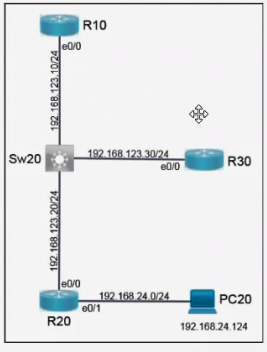
This is a lab item in which tasks will be performed on virtual devices.
EIGRP is preconfigured on all routers. Configure R20 and R30 to complete these tasks.
Task 1:
Modify the existing ACL on R30 so that EIGRP routes are received from R10 and R20.
Task 2:
Configure CoPP on R20 to achieve these results:
Answers
R30
R30>en
R30#config t
###"ip access-list extended 120". Assuming the pre-configuration specifies an extended ACL with the number 120, proceed with this configuration. However, during the exam, you must use the command
“sh run | sec acc” to view the specific ACLs present in the current configuration. Copy the existing ACLs from the configuration, and then, under the relevant ACL entry, insert the line “5 permit eigrp any
any”.
R30(config)#ip access-list extended 120
R30(config-ext-nacl)#5 permit eigrp any any
R30(config-ext-nacl)#end
R30#wr
R20
R20>en
(Invalid number of answers)R20#config t
R20(config)#ip access-list extended TELNET
R20(config-ext-nacl)#permit tcp host 192.168.24.124 any eq telnet
R20(config-ext-nacl)#exit
R20(config)#class-map match-any TELNET
R20(config-cmap)#match access-group name TELNET
R20(config-cmap)#exit
R20(config)#policy-map COPP
R20(config-pmap)#class TELNET
R20(config-pmap-c)#police 10000 conform-action transmit exceed-action drop
R20(config-pmap-c)#control-plane
R20(config-cp)#service-policy input COPP
R20(config-cp)#end
R20#wr
Brave-Dump Clients Votes