View all questions & answers for the FCSS - Network Security 7.4 Support Engineer Exam Materials exam
FCSS - Network Security 7.4 Support Engineer Exam Materials-Question 45 Discussion
Comments
Selected Answers: C
Selected Answers: C
To allow asymmetric routing, use the following commands:
config system settings
set asymroute enable
end
How asymmetric routing behaves:
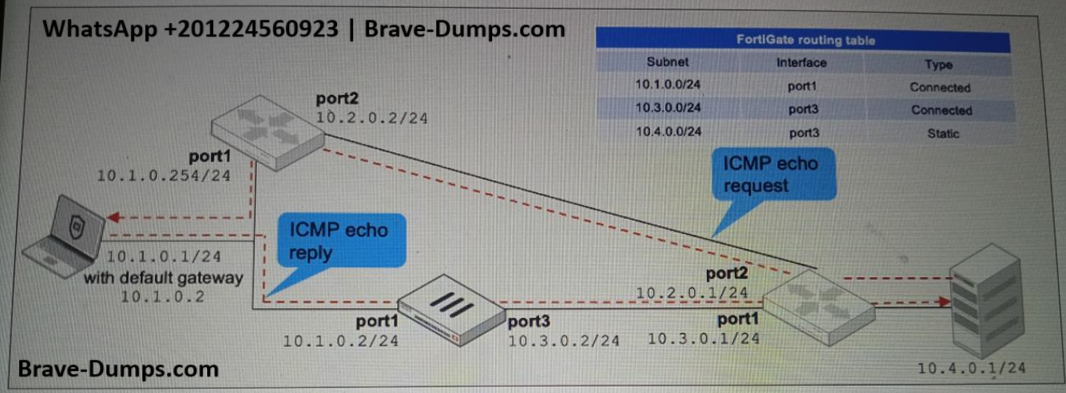
(1) The server’s ICMP request bypasses the FortiGate and reaches the PC directly.
(2) The PC sends an echo reply, which returns through the FortiGate. Since there's no matching session, the packet is not dropped — instead, it is passed to the FortiGate’s CPU and forwarded using the Forwarding Information Base (FIB).
(3) All subsequent echo replies are treated the same way: forwarded by the CPU without a session match.
(4) FortiGate behaves like a basic router in this mode — no security inspection is applied.
Note: If you enable asymmetric routing for troubleshooting, be sure to disable it after resolving the issue.
Refer to the exhibit, which shows a network topology and a partial routing table. FortiGate has already been configured with a firewall policy that allows all ICMP traffic to flow from port1 to port3. Which changes must the administrator perform to ensure the server at 10.4.0.1/24 receives the echo reply from the laptop at 10.1.0.1/24?. (Choose one answer)
Brave-Dump Clients Votes