View all questions & answers for the NSE 4 - FortiOS 7.6 Administrator Exam Materials exam
Comments
Selected Answers: D
edit "NOC_access"
set admintimeout-override enable
set admintimeout 50
next
end
-
Zdenek
2025-10-22 12:41:14
FortiGate 7.6 Administrator Study Guide, page 21 says that "The Override Idle Timeout" option allows the "admintimeout" value to be overridden for each access profile. Therefore the correct answer should be D. B is incorrect because "offline value" does not exist.
Selected Answers: D
Selected Answers: D
- admintimeout is the parameter that controls how long an administrator’s GUI session can remain idle before being disconnected.
- By default, FortiGate sets this to 5 minutes. If the NOC team wants longer sessions without being logged out, the administrator must increase this value in the specific admin profile (NOC_Access).
- The other options are incorrect because:
- A. Move NOC_Access to the top of the list → Ordering of profiles does not affect timeout behavior.
- B. Increase Override Idle Timeout → This parameter applies to individual admin accounts, not profiles. The question specifies the admin profile.
- C. Assign super_admin role → This changes privileges, not session timeout.
✅ So the administrator should configure:
config system accprofile
edit NOC_Access
set admintimeout <desired value in minutes>
next
end
Selected Answers: B
Selected Answers: B
Selected Answers: D
Selected Answers: B
Override Idle Timeout
Never Timeout
Offline - 1-480 minutes
B - 200%
Selected Answers: B
Selected Answers: B
Selected Answers: D
Global Timeout: By default, all admins follow the global timer set under config system global (usually 5 minutes).
Profile Override: To satisfy a specific request for one group (like the NOC team) without changing the timeout for every other administrator on the device, you use an Access Profile override.
By navigating to config system accprofile and editing the NOC_Access profile, you can use the set admintimeout command to define a longer duration specifically for users assigned to that profile.
B: While "Override Idle Timeout" is the name of the toggle in the GUI, the actual parameter being adjusted is the admintimeout. Furthermore, "offline value" is not standard FortiGate terminology for this setting.
Selected Answers: B
If you want to adjust the timeout specifically for a certain admin profile (like NOC_access), you must use the “Override idle timeout” setting within that admin profile.
So:
Option B correctly targets the requirement: extending session time only for the NOC team without affecting others.
Selected Answers: B
Selected Answers: B
Selected Answers: B
Selected Answers: D
Selected Answers: D
nse4-fw (group) # edit "hfljflhjfljh"
nse4-fw (hfljflhjfljh) # show
config user group
edit "hfljflhjfljh"
next
end
nse4-fw (hfljflhjfljh) # show
config user group
edit "hfljflhjfljh"
next
end
nse4-fw (hfljflhjfljh) # get
name : hfljflhjfljh
id : 2
group-type : firewall
authtimeout : 0
auth-concurrent-override: disable
http-digest-realm :
member :
match:
nse4-fw (hfljflhjfljh) # get
<Enter>
nse4-fw (hfljflhjfljh) #
config Configure object.
set Modify value.
unset Set to default value.
select Select multi-option values.
unselect Unselect multi-option values.
append Append values to multi-option.
clear Clear multi-option values.
get Get dynamic and system information.
show Show configuration.
next Configure next table entry.
abort End and discard last config.
end End and save last config.
nse4-fw (hfljflhjfljh) # get
<Enter>
nse4-fw (hfljflhjfljh) # edit h
command parse error before 'edit'
nse4-fw (hfljflhjfljh) # edit h
command parse error before 'edit'
nse4-fw (hfljflhjfljh) # edit h
command parse error before 'edit'
nse4-fw (hfljflhjfljh) # edit
command parse error before 'edit'
nse4-fw (hfljflhjfljh) # set
group-type Set the group to be for firewall authentication, FSSO, RSSO, SCIM, or guest users.
authtimeout Authentication timeout in minutes for this user group. 0 to use the global user setting auth-timeout.
auth-concurrent-override Enable/disable overriding the global number of concurrent authentication sessions for this user group.
http-digest-realm Realm attribute for MD5-digest authentication.
member Names of users, peers, LDAP severs, RADIUS servers, SCIM client or external idp servers to add to the user group.
nse4-fw (hfljflhjfljh) # set
Selected Answers: B
Selected Answers: B
Offline timeout is exactly what is relevant here.
Selected Answers: D
Selected Answers: D
Selected Answers: B
edit "NOC_Access"
set admintimeout-override enable
set admintimeout <minutes>
next
end
Selected Answers: B
idle timeout ==> The idle timeout is the amount of time an administrator can stay logged into the Fortigate without any activity. System -> Settings -> Idle timeout for all administrators.
However, this value can be overridden on a per-admin basis by applying a custom admin profile for the administrator to override the setting.
system > admin profiles > override idle timeout
Selected Answers: B
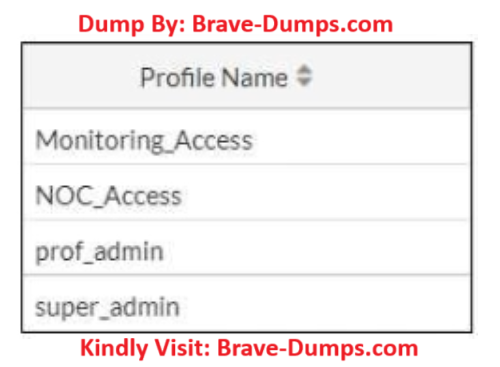
Refer to the exhibit. The NOC team connects to the FortiGate GUI with the NOC_Access admin profile. They request that their GUI sessions do not disconnect too early during inactivity. What must the administrator configure to answer this specific request from the NOC team? (Choose one answer)
Brave-Dump Clients Votes