View all questions & answers for the NSE 4 - FortiOS 7.6 Administrator Exam Materials exam

NSE 4 - FortiOS 7.6 Administrator Exam Materials-Question 75 Discussion
Comment Image Comment Image Comment Image

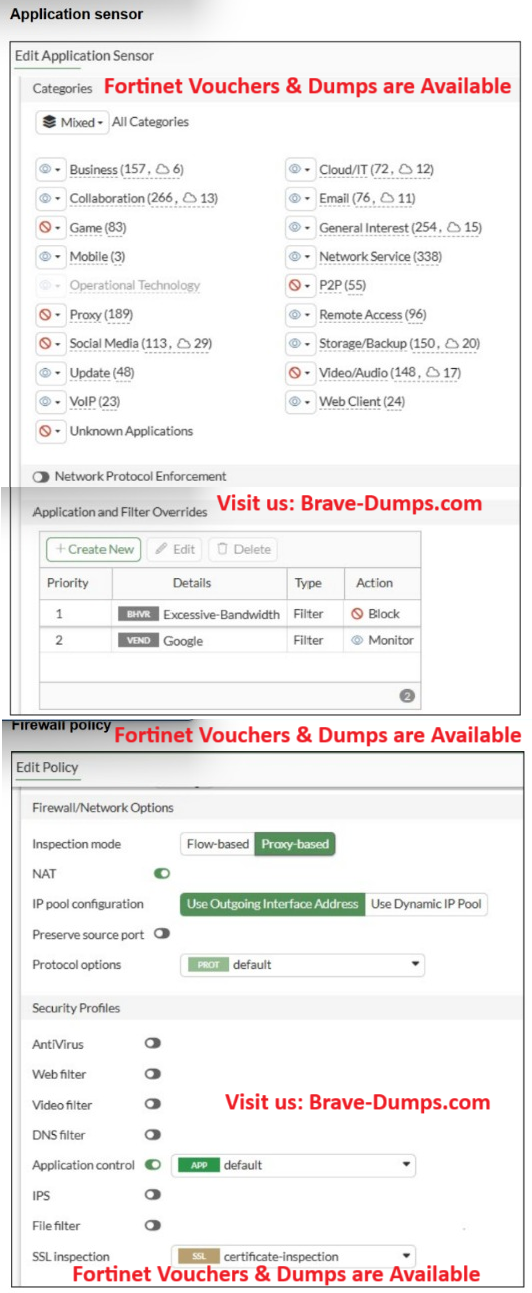
Refer to the exhibits. You have implemented the application sensor and the corresponding firewall policy as shown in the exhibits. You cannot access any of the Google applications, but you are able to access www.fortinet.com. What would you do to resolve this issue? (Choose one answer)

  • A. Change the Inspection mode to Proxy-based.
  • B. Set SSL inspection to deep-content-inspection.
  • C. Move up Google in the Application and Filter Overrides section to set its priority to 1.
  • D. Add Google.com to the URL category in the security profile
Correct Answer: B

Brave-Dump Clients Votes

C 50%
B 42.86%
D 7.14%

Comments


Mahboab Ali Ghaleb 2025-07-10 07:50:34

Selected Answers: B


B is correct


FRANCOIS 2025-12-21 21:54:42

Selected Answers: C


This question is duplicated, and the provided answer is incorrect. The correct answer should be C. Also, an option is missing: In Application and Filter Overrides, set the action for Google to Allow.


Anonymous User 2026-02-23 15:19:04

Selected Answers: C


Agree this should be C, B is incorrect as setting inspection to deep inspection will cause issues with TLS pinning


J K 2026-03-15 02:35:26

Selected Answers: D


which is correct here? @admin


Rebecca Marriott 2026-03-17 16:31:43

Selected Answers: B


Based on the technical requirements of FortiGate Application Control, the correct answer is B. Set SSL inspection to deep-content-inspection.
Why other options are incorrect:
A: The inspection mode is already set to Proxy-based (indicated by the green toggle in the Firewall Policy exhibit).
C: Moving the priority would only help if the "Priority 1" rule was the one blocking the traffic. Priority 1 appears to be for "Remote.Management" or similar, which wouldn't normally capture standard Google web traffic.
D: Adding a URL to a category is a Web Filter function. The issue here is related to the Application Control sensor failing to identify encrypted apps.


Anonymous User 2026-04-11 18:16:56

Selected Answers: C


C is correct.
deep-content-inspection doesn't exist


Anonymous User 2026-04-16 16:28:15

Selected Answers: B


@Brave-Dumps.com Admin What is the Correct Answer ?
  • Brave-Dumps.com Admin 2026-04-16 17:49:51
    B


saquib ansari 2026-05-03 10:00:19

Selected Answers: C


In Application and Filter Overrides, set the action for Google to Allow


Anonymous User 2026-06-07 13:59:34

Selected Answers: B


it's B


Ahmed El Hasseen El Tom El Shaikh Berair 2026-07-14 10:39:21

Selected Answers: C


75


Sidney 2026-07-24 05:50:34

Selected Answers: C


C


Anonymous User 2026-08-27 12:24:30

Selected Answers: B


which is correct here? @admin


AHMAD ALRAMADAN 2026-09-06 23:26:04

Selected Answers: B


what is the correct ?


[email protected] 2026-10-11 10:00:12

Selected Answers: C


FortiOS check rules within Application and Filter overrides from top to bottom. Currently Priority 1 is set to Block including google applications while Google set to Monitor at Priority 2. Because blocking rule is evaluated first, Google Traffic is blocked before it reaches 2nd rule. Hence, moving Google entry to Priority 1 ensures it is evaluated first, allowing the traffic to be monitored/allowed instead of blocking.


A is wrong, as shown in firewall policy exhibit, it is already set to proxy-based inspection.
B is wrong, because SSL inspection to deep-content-inspection will not fix the rule ordering conflict top to bottom.
D is wrong as adding URL belongs to web filtering profile not application control profile.