View all questions & answers for the FCSS - SD-WAN 7.4 Architect Exam Materials exam
FCSS - SD-WAN 7.4 Architect Exam Materials-Question 61 Discussion
Comments
Selected Answers: C
Selected Answers: A
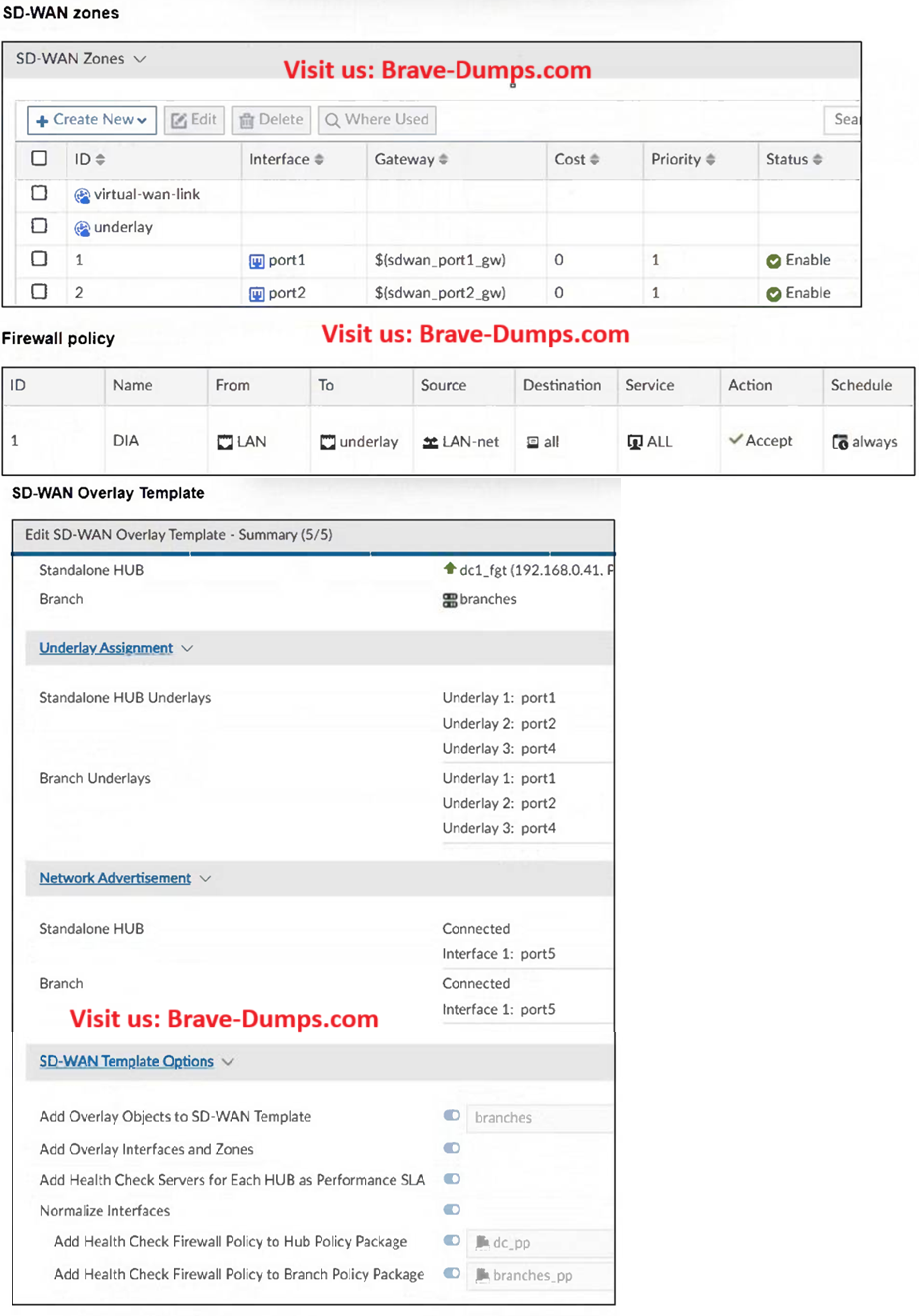
If you want to confirm whether the issue is truly related to the gateways (as suggested in option C), check the values of the variables like ${sdwan_port1_gw} in the FortiManager settings or directly on the device.
But without that confirmation, option A remains the most clear and straightforward explanation based on the information we have.
-
michael
2025-07-09 02:47:09
Thanks Omar, u have done a good job overall. In option A, do you think when we move interfaces to zones, it will loose DIA access? underlay zone is shown in the firewall policy. if the ports have gateway DIA should work even after the zone creation. your thoughts are valuable to get a final decision. -
Brave-Dumps.com Admin
2025-07-09 22:48:00
Yes, DIA breaks not due to gateway issues, but because the firewall policy doesn’t match anymore after the zone change.
Selected Answers: A
-
Brave-Dumps.com Admin
2025-07-11 21:02:56
Good luck Michael, It was a pleasure discussing and exchanging knowledge with you. I wish you the best of luck on your exam! Once you've finished, I’d really appreciate it if you could leave some feedback on the website. -
michael
2025-07-18 12:59:03
thanks! sure thing Omar!
Selected Answers: A
Refer to the exhibit. The FortiGate devices are managed by FortiManager and initially configured for Direct Internet Access (DIA). After confirming DIA works, the administrator uses an SD-WAN overlay template to configure IPsec tunnels and SD-WAN rules to connect branches to a hub. After applying changes, users report that internet access no longer works. Which statement best describes the root cause? (Choose one answer)
Brave-Dump Clients Votes