View all questions & answers for the NSE 4 - FortiOS 7.6 Administrator Exam Materials exam
Comments
Selected Answers: A, C
A) should be correct as 8888 is a default port too (8888, 53 or 443)
Maybe D is wrong answer!
Selected Answers: A, B
This ensures standard connectivity without requiring custom port configurations.
FortiGate identified the FortiGuard Server using DNS lookup
DNS resolution is used to locate and connect to FortiGuard services efficiently.
Selected Answers: A, C
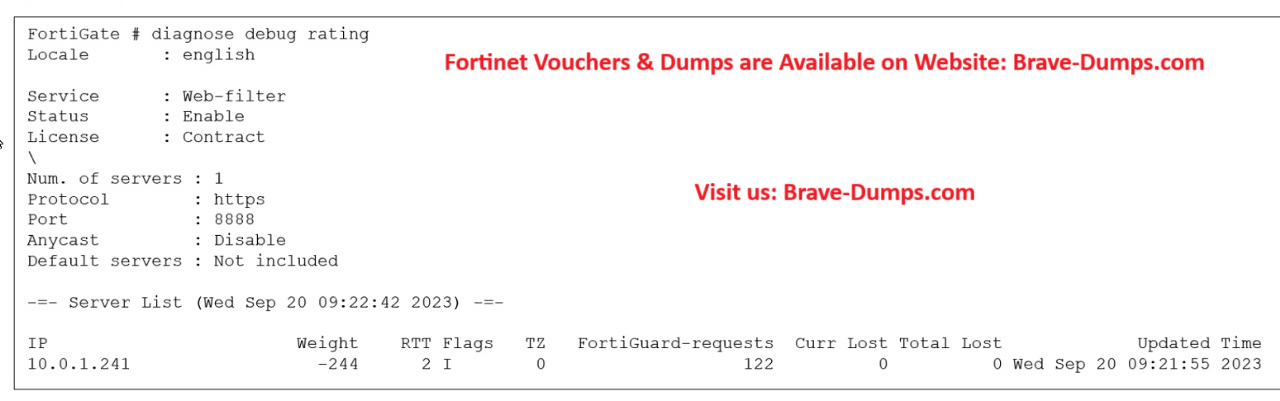
C) Is correct. Flags: D (IP returned from DNS), I (Contract server contacted), T (being timed), F (failed). As you can see, the image shows the flag ID "I" which is not DNS. It's the contract server being contacted).
Selected Answers: A, C
Selected Answers: C, D
the port here is 8888 which is not the default one as 443
so answer A is wrong because it states that the default port is used
Disable FortiGuard anycast setting on CLI to use ((((UDP ))))ports 443, 53, or 8888
so answer D is correct you can change FortiGuard communication to unreliable protocol (udp)
study guide fortigate 7.6 page 279
-
WillyB
2025-12-05 00:44:10
I also agree with answers being C,D / The study guide is very clear on the default port: "By default, FortiGate is configured to enforce the use of HTTPS port 443 to perform live filtering with FortiGuard" And by disabling anycast setting "other" (not default) ports are available like UDP(AKA unreliable) 8888, which also makes D a right choice.
Selected Answers: C, D
Selected Answers: C, D
"You can verify the connection to FortiGuard servers by running the diagnose debug rating CLI command. This command displays a list of FortiGuard servers you can connect to, as well as the following information:
• Weight: It is based on the difference in time zones between FortiGate and this server to reduce the possibility of using a remote server.
• RTT: Return trip time
• Flags: D (IP returned from DNS), I (Contract server contacted), T (being timed), F (failed)
• TZ: Server time zone
• FortiGuard-requests: The number of requests sent by FortiGate to FortiGuard
• Curr Lost: Current number of consecutive lost FortiGuard requests (in a row, it resets to 0 when one packet succeeds)
• Total Lost: Total number of lost FortiGuard requests"
"By default, FortiGate is configured to enforce the use of HTTPS port 443 to perform live filtering with FortiGuard or FortiManager. When the fortiguard-anycast command is enable, the FortiGuard domain name resolves to a single anycast IP address, which is the only entry in the list of FortiGuard servers. By disabling the FortiGuard anycast setting on the CLI, other ports and protocols are available. These ports and protocols query the servers (FortiGuard or FortiManager) on HTTPS port 53 and port 8888, UDP port 443, port 53, and port 8888. If you are using UDP port 53, any kind of inspection reveals that this traffic is not DNS and prevents the service from working. In this case, you can switch to the alternate UDP port 443 or port 8888, or change the protocol to HTTPS, but these ports are not guaranteed to be open in all networks, so you must check beforehand."
Selected Answers: C, D
"FortiGuard servers use Anycast addresses in order to optimize and distribute traffic across many servers.
Anycast is the default access mode for FortiGates when connecting to FortiGuard which by default utilizes
HTTPS and port 443"
If FortiGuard is not reachable via Anycast, choose between the following options to work around this issue:
1. Switch to other Anycast servers:
config system fortiguard
set fortiguard-anycast enable
set fortiguard-anycast-source aws
end
2. Disable Anycast and use HTTPS:
config system fortiguard
set fortiguard-anycast disable
set protocol https
set port 8888
end
3. Disable Anycast and use UDP:
config system fortiguard
set fortiguard-anycast disable
set protocol udp
set port 53
end"
D- You can configure unreliable protocols to communicate with FortiGuard Server.
This does not represent the results of the previous command in the screenshot, but rather it is a verification of the possibility of configuring the UDP protocol (somewhat confusing).
Selected Answers: A, C
-
Brave-Dumps.com Admin
2026-04-16 16:54:06
C,D
Selected Answers: C, D
Selected Answers: C, D
True: As documented in the https://community.fortinet.com/fortigate-3/technical-tip-fortiguard-flags-and-meanings-104863 , the Weight calculation is a metric of server health and location proximity. The weight value dynamically increases with each lost or failed packet and decreases with successful transactions.
D. You can configure unreliable protocols to communicate with FortiGuard Server.
True: By default, FortiGate uses a reliable protocol (HTTPS over port 443) with Anycast enabled. However, when Anycast is disabled (as shown in the CLI screenshot: Anycast : Disable), administrators gain the flexibility to change the protocol from HTTPS to UDP, which is inherently a connectionless and unreliable protocol. This is used to reduce protocol overhead or bypass network blocks.
Which two statements about the FortiGuard connection are true? (Choose two answers)
Brave-Dump Clients Votes