View all questions & answers for the NSE 6 - FortiManager 7.6 Administrator Exam Materials exam
Comments
Selected Answers: B
"Mobile FortiToken FTFKMO84A9AC5C56D used by user local HR_user could not be found at device"
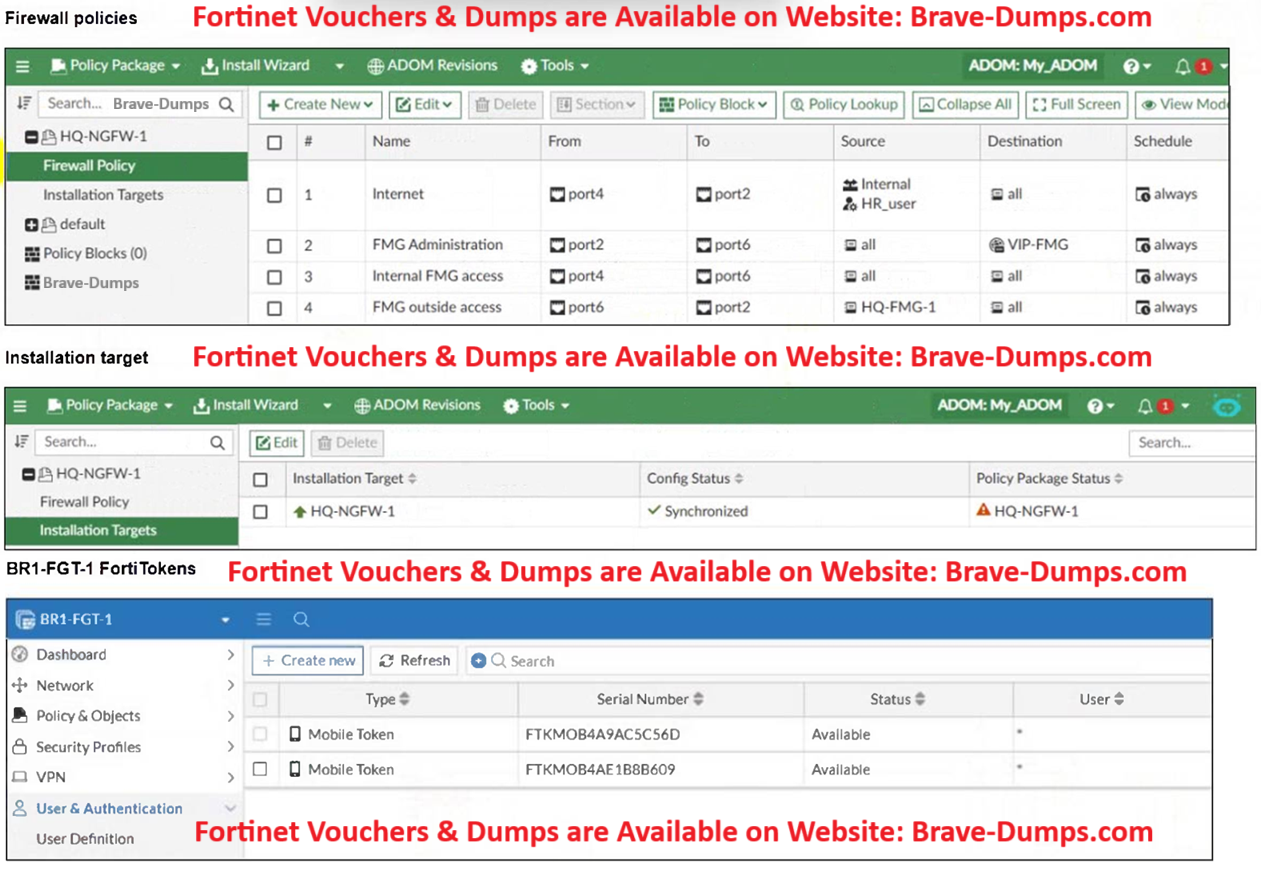
This means that the FortiToken being referenced in FortiManager does not exist on the target device (HQ-NGFW-1). FortiTokens must be physically present or registered on the FortiGate (HQ-NGFW-1) before they can be referenced in user configurations or pushed via FortiManager
-
Mohanad Salem
2026-02-13 13:56:48
but the FortiToken its already exist on HQ-NGFW-1 -
Sean Foster
2026-04-22 22:25:48
Mohanad Salem - It doesn't, the 2nd image shows BR1-FGT-1 not HQ-NGFW-1
Selected Answers: D
Mobile FortiToken FTFKMO84A9AC5C56D used by user local HR_user could not be found at device
"user local", "FTKMOB4A9AC5C56D", id=5586, COMMIT FAIL - invalid value - prop[user fortitoken]:
Mobile FortiToken FTFKMO84A9AC5C56D used by user local HR_user could not be found at device
In the Fortigate the User no exist, exist only in FMG, the admin sould use device peer-mapping, so that this work correctly and this can create de user with its fortitoken.
Selected Answers: D
"If the user does not exist, token deployment fails
Selected Answers: B
Because the tokens do not exist on the FortiGate, the push failes.
Selected Answers: B
Selected Answers: B
Selected Answers: B
The token referenced in the failure script is located on BR1-FGT-1 (check the 2nd image) Not HQ-NGFW-1 in the script.
Refer to the exhibits. An administrator needs to push a FortiToken Mobile to assign it to HR_user in the HQ-NGFW-1. However, when installing the policy package, they receive the following error message: Copy device global objects Vdom copy failed: error -999 - Copy objects for vdom root "firewall policy", "1", id=5532, COMMIT FAIL - invalid value - prop[user fortitoken]: Mobile FortiToken FTFKMO84A9AC5C56D used by user local HR_user could not be found at device "user local", "FTKMOB4A9AC5C56D", id=5586, COMMIT FAIL - invalid value - prop[user fortitoken]: Mobile FortiToken FTFKMO84A9AC5C56D used by user local HR_user could not be found at device Why is the administrator not able to install the FortiToken on the HQ-NGFW-1 firewall? (Choose one answer)
Brave-Dump Clients Votes