View all questions & answers for the NSE 6 - FortiManager 7.6 Administrator Exam Materials exam
Comments
Selected Answers: A
-
Mahboab Ali Ghaleb
2025-07-22 11:08:57
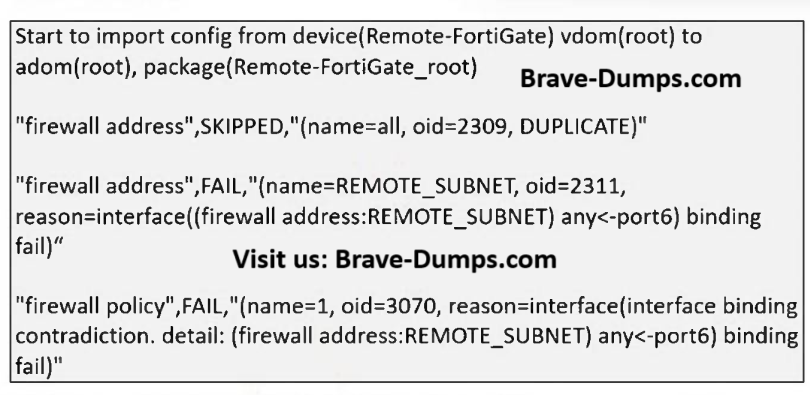
This is incorrect. FortiManager does support per-device mappings. The failure for REMOTE_SUBNET is a specific "interface binding fail," implying a conflict or misconfiguration, not a general lack of feature support.
Selected Answers: B
Though, the imported REMOTE_SUBNET address and a firewall policy are failed, but the package container itself is created.
Selected Answers: A
(Study Guide – sección Policy Package Import behavior)
Selected Answers: D
FortiManager parses the configuration and creates corresponding objects in the ADOM database.
If the imported policy references an address object (e.g., REMOTE_SUBNET) that does not already exist in the ADOM database, FortiManager automatically creates that object during the import process.
This behavior ensures that the imported policy remains consistent and functional within FortiManager.
Selected Answers: B
https://community.fortinet.com/t5/FortiManager/Troubleshooting-Tip-FortiManager-import-fails-due-to-binding/ta-p/327485
Policy Pack is created, but the import has errors --> B is the right answer.
A is wrong, per Device mappings are supported for adress objects.
C is wrong, the import failed, the manager won't just change attributes. The error stems from contradicting values.
D is wrong, the object is only created when the import goes without fail. Because of the error, the object is not created.
Selected Answers: B
A is wrong, FM support Adresses Objects for mappings
Refer to the exhibit. What can you conclude from the downloaded import report? (Choose one answer)
Brave-Dump Clients Votes