View all questions & answers for the NSE 6 - FortiManager 7.6 Administrator Exam Materials exam
Comments
Selected Answers: A, C
Selected Answers: B, C
✔️ Correct — In normal mode, an admin can lock policy blocks manually. This is optional, not required as in workspace mode.
C. The same administrator can lock more than one ADOM at the same time.
✔️ Correct — In normal mode, ADOMs are not strictly locked per user/session, and there's no workspace locking limitation like in workspace or workflow modes. One admin can work on multiple ADOMs freely.
-
Brave-Dumps.com Admin
2025-10-09 17:49:25
Dear Omar, We used only official Fortinet documentation to answer the questions. Please include the reference page or link you used for your answer.
Selected Answers: A, C
Selected Answers: A, C
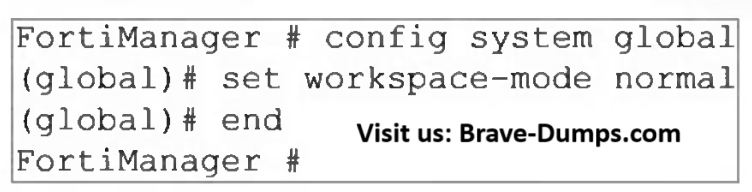
Enables Locking: This mode compels administrators to lock an ADOM before making any configuration changes.
No Approval Required: Unlike workflow mode, normal mode does not require changes to be submitted for approval.
⇒ Because normal mode utilises the locking mechanism, if an administrator’s session ends abruptly (browser crash or connection loss) while they have an ADOM locked, the lock remains active. Other administrators cannot edit that ADOM until the session times out or an admin with appropriate privileges manually unlocks it.
⇒ FortiManager allows a single administrator to hold locks on multiple different ADOMs simultaneously.
Selected Answers: A, C
"You cannot lock an individual policy when the policy is used in a policy block." --> B is false
(You CAN lock global adom)
D is false as well: This describes Worflow mode, not workspace mode.
A&C are correct.
Selected Answers: A, C
Refer to the exhibit. What are two results from the configuration shown in the exhibit? (Choose two answers)
Brave-Dump Clients Votes