View all questions & answers for the NSE 7 - Enterprise Firewall 7.6 Administrator Exam Materials exam
Comments
Selected Answers: A, B
Selected Answers: A, B
Selected Answers: A, B
Selected Answers: B, C
b and c are correct
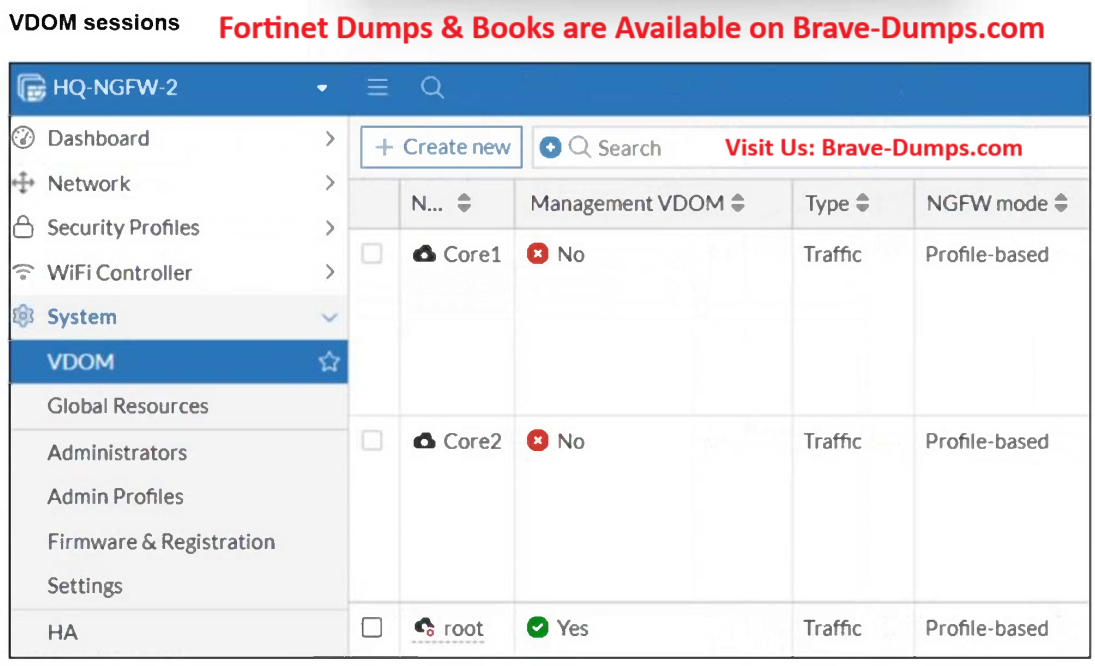
b: since the root vdom is the Management vdom it needs access to Fortiguard
c: you can configure FortiManager as a FDS so in that case the root vdom would need access to the FortiManager to get updates.
A is wrong since a non-management vdom does not update FortiGuard resources, therefore it does not need internet access or a link to the management vdom
Selected Answers: B, C
Selected Answers: B, C
Selected Answers: B, C
Selected Answers: B, C
If your management VDOM does not have internet access or is not connected to a FortiManager serving as a FortiGuard Distribution Server (FDS) in a closed network, then the firewall and all VDOMs may experience issues with the FortiGuard databases, potentially leading to firewall malfunctions.
Page 74 of Study Guide:
If your VDOM (VDOM1, for instance) lacks internet access, and you need to connect through another firewall VDOM (root) that has internet, an inter-VDOM Link enables VDOM1 to access the internet via the root VDOM.
As the question mentions web filtering stopped working after the maintenance window, so it was working before it, so the VDOM links were already established considering no change in having "root" VDOM as the management VDOM, then answer is B (public FDS) or C (FMG FDS)
Selected Answers: B, C
Selected Answers: A, B
C :Web filtering works perfectly without FortiManager
D :Only ONE management VDOM is allowed
Selected Answers: B, C
Selected Answers: B, C
Selected Answers: B, C
Selected Answers: B, C
Selected Answers: B, C
D is incorrect: A FortiGate unit can only have one VDOM designated as the Management VDOM at any given time. You cannot enable management capabilities on Core1 and Core2 simultaneously to pull updates independently.
Refer to the exhibit. The VDOM configuration on a FortiGate device is shown. You discover that web filtering stopped working in Core1 and Core2 after a maintenance window. What are two reasons why web filtering stopped working? (Choose two answers)
Brave-Dump Clients Votes