View all questions & answers for the NSE 7 - Enterprise Firewall 7.6 Administrator Exam Materials exam
Comments
Selected Answers: B
-
Brave-Dumps.com Admin
2025-11-29 18:04:48
Why?
Selected Answers: B
Selected Answers: C
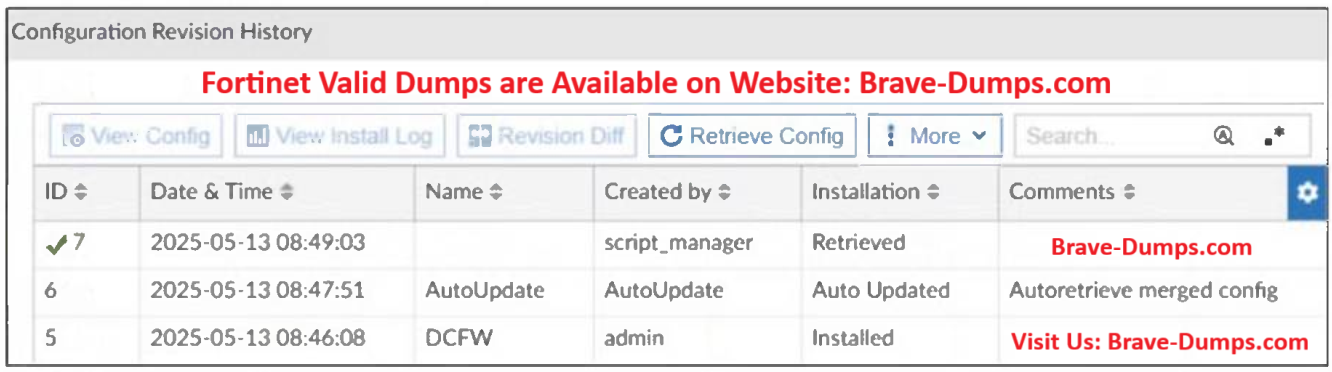
"Since the script is installed directly on the FortiGate it will automatically perform a Retrieve back to FortiManager,"
We can see that running "Remote FortiGate Directly (via CLI)" from FortiManager generates similar entry in "Configuration Revision History" with Name = <null> & Created by = script_manager & Installation = Retrieved
Selected Answers: C
Selected Answers: C
Selected Answers: A
Selected Answers: C
Refer to the exhibit. A revision history window at the FortiManager device layer is shown. The IT team is trying to identify the administrator responsible for the most recent update to the FortiGate device database. What can the IT team conclude? (Choose one answer)
Brave-Dump Clients Votes