View all questions & answers for the FCSS – SD-WAN 7.6 Architect Exam Materials exam
FCSS – SD-WAN 7.6 Architect Exam Materials-Question 13 Discussion
Comments
Selected Answers: B, C
Selected Answers: C
https://docs.fortinet.com/document/fortimanager/7.6.4/administration-guide/275483/configuring-an-sd-wan-overlay-template
I dont see another logically correct answer here
Selected Answers: C, D
https://docs.fortinet.com/document/fortimanager/7.6.4/administration-guide/275483/configuring-an-sd-wan-overlay-template
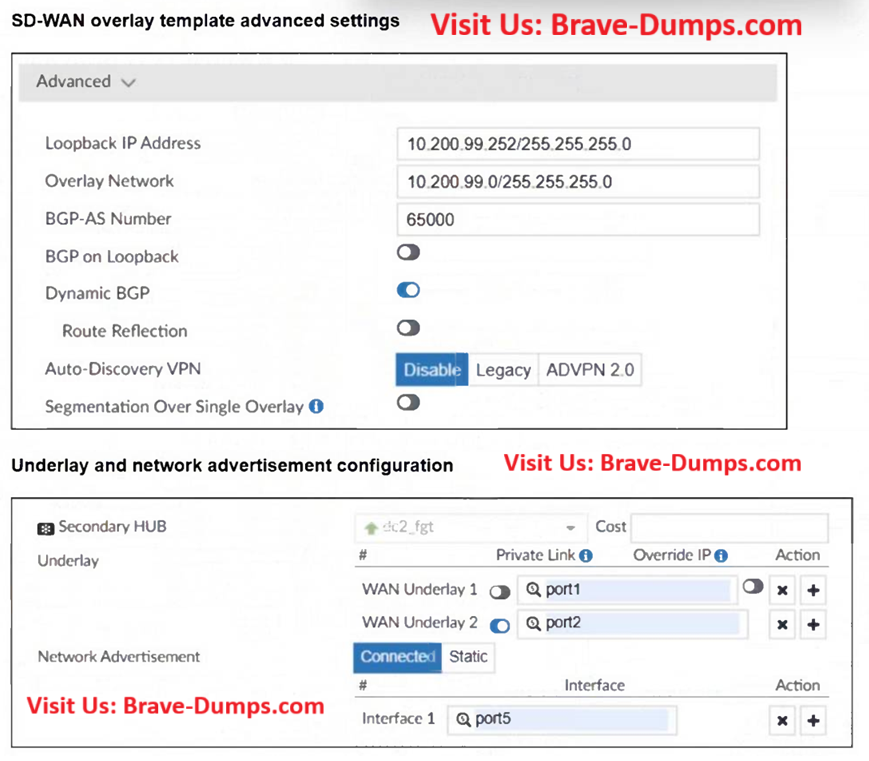
WAN Underlay
Type the interfaces for the SD-WAN branch WAN underlay. You can add additional WAN underlays by clicking the add icon.
For each WAN underlay, you can optionally enable the following settings:
Private Link No overlays will be created on private links.
Selected Answers: C, D
Refer to the exhibits. The SD-WAN overlay template, advanced settings, and the underlay and network advertisement settings are shown. These are the configurations for the secondary hub of a dual-hub SD-WAN topology created with the FortiManager SD-WAN overlay orchestrator. Which two conclusions can you draw from the information shown in the exhibits? (Choose two answers)
Brave-Dump Clients Votes