View all questions & answers for the NSE 7 - FortiSASE 25 Enterprise Administrator Exam Materials exam
NSE 7 - FortiSASE 25 Enterprise Administrator Exam Materials-Question 3 Discussion
Comments
Selected Answers: A
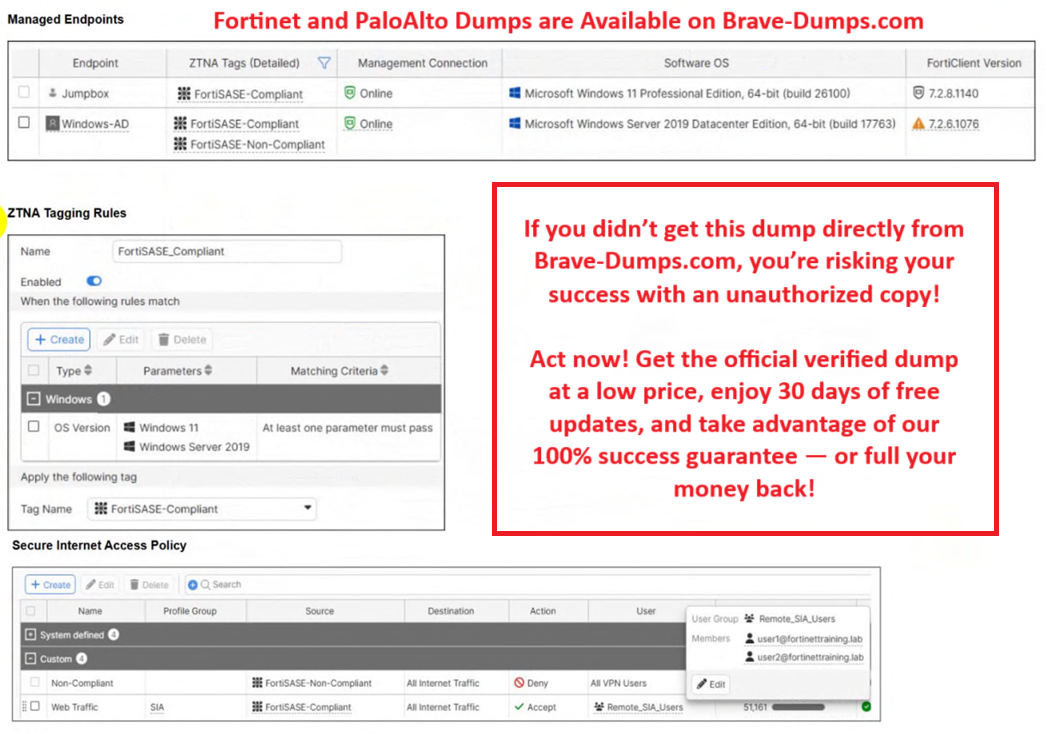
You’ve got two endpoints:
Endpoint Status OS FortiClient Tag
Jumpbox Online Win11 FortiSASE-Compliant
Windows-AD Online Win Server 2019 FortiSASE-Non-Compliant
A policy is shown:
If endpoint tag = FortiSASE-Non-Compliant → DENY all Internet Traffic
The AD server is tagged Non-Compliant
The Jumpbox is tagged Compliant
Result: Jumpbox can browse, Windows-AD can’t.
The answer choices
Let’s break them using logic:
A. The device security posture for Windows-AD has changed.
This perfectly matches the exhibits. Windows-AD used to be compliant and now it’s tagged Non-Compliant → access denied.
B. The FortiClient version installed on Windows-AD does not match the expected version on FortiSASE.
Even if this were true, the policy doesn’t block based on version directly. The enforcement is based on the tag. This option is not strong enough and not directly supported by the policy screenshot.
C. Windows-AD is excluded from FortiSASE management.
It’s literally shown as managed. So this is impossible.
D. The remote VPN user on Windows-AD no longer matches any VPN policy.
There’s nothing about VPN failure here. The device is online and just denied by posture.
So why is A correct and not B?
Because the exhibits prove a posture mismatch and a tag change, not a version policy mismatch.
FortiSASE doesn’t block based on version unless a policy is configured to enforce that. There’s no shown rule like “only version x can access internet.” It’s literally just posture tag → allow or deny.
The only visible cause = posture changed → tag changed → denied.
Final answer
A. The device security posture for Windows-AD has changed.
Selected Answers: A
You’ve got two endpoints:
Endpoint Status OS FortiClient Tag
Jumpbox Online Win11 FortiSASE-Compliant
Windows-AD Online Win Server 2019 FortiSASE-Non-Compliant
A policy is shown:
If endpoint tag = FortiSASE-Non-Compliant → DENY all Internet Traffic
The AD server is tagged Non-Compliant
The Jumpbox is tagged Compliant
Result: Jumpbox can browse, Windows-AD can’t.
The answer choices
Let’s break them using logic:
A. The device security posture for Windows-AD has changed.
This perfectly matches the exhibits. Windows-AD used to be compliant and now it’s tagged Non-Compliant → access denied.
B. The FortiClient version installed on Windows-AD does not match the expected version on FortiSASE.
Even if this were true, the policy doesn’t block based on version directly. The enforcement is based on the tag. This option is not strong enough and not directly supported by the policy screenshot.
C. Windows-AD is excluded from FortiSASE management.
It’s literally shown as managed. So this is impossible.
D. The remote VPN user on Windows-AD no longer matches any VPN policy.
There’s nothing about VPN failure here. The device is online and just denied by posture.
So why is A correct and not B?
Because the exhibits prove a posture mismatch and a tag change, not a version policy mismatch.
FortiSASE doesn’t block based on version unless a policy is configured to enforce that. There’s no shown rule like “only version x can access internet.” It’s literally just posture tag → allow or deny.
The only visible cause = posture changed → tag changed → denied.
Final answer
A. The device security posture for Windows-AD has changed.
Refer to the exhibits. Jumpbox and Windows-AD are endpoints from the same remote location. Jumpbox can access the internet through FortiSASE, while Windows-AD can no longer access the internet. Based on the information in the exhibits, which reason explains the outage on Windows-AD? (Choose one answer)
Brave-Dump Clients Votes