View all questions & answers for the NSE 5 - FortiSwitch 7.6 Administrator Exam Materials exam
NSE 5 - FortiSwitch 7.6 Administrator Exam Materials-Question 15 Discussion
Comments
Selected Answers: A, D
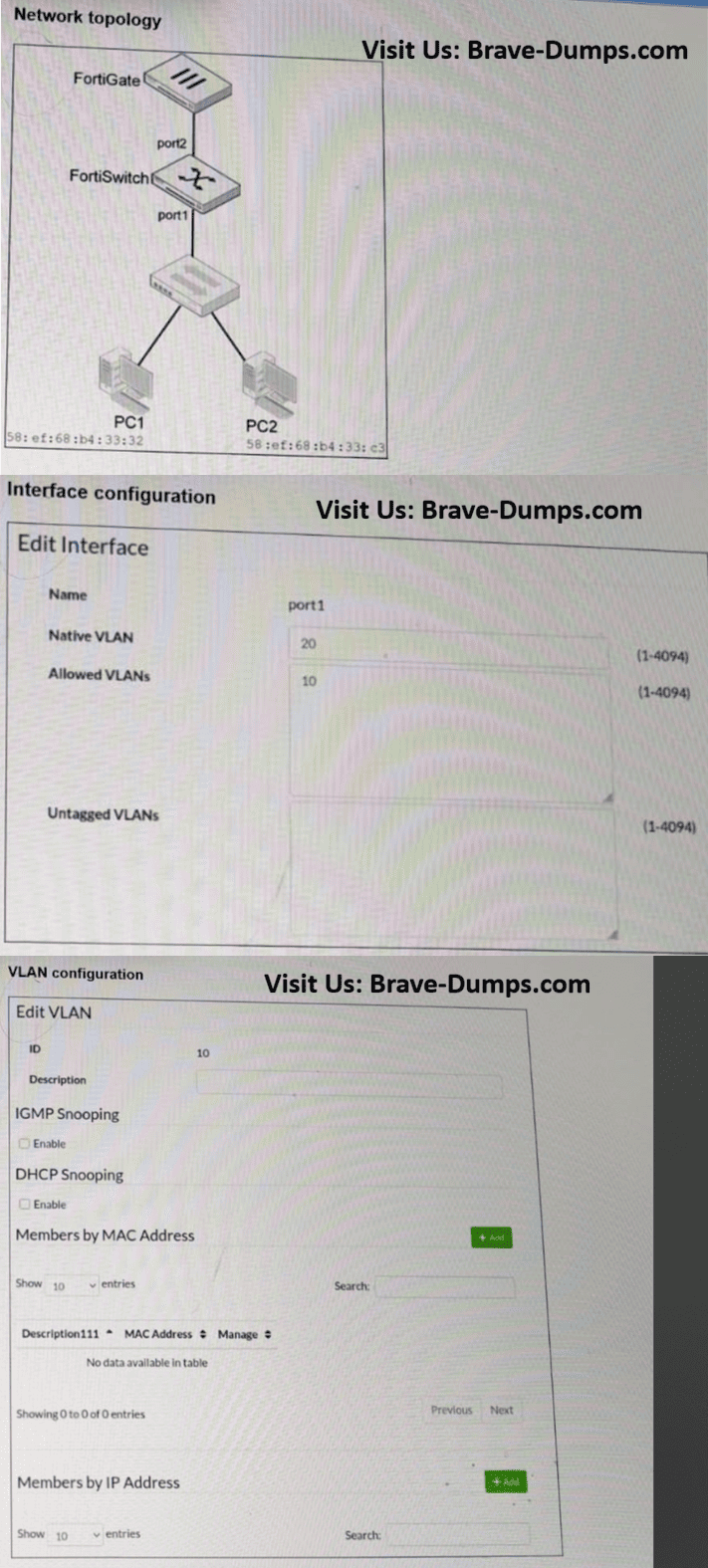
If the connected device expects to receive untagged traffic, then you must also include VLAN 10 in the untagged VLANs setting so FortiSwitch forwards the frames without a VLAN tag.
PAGE: 367 | FORTISWITCH 7.6 ADMIN GUIDE
Selected Answers: A, C
Untagged VLANs do not bypass Allowed VLANs; Fortinet documentation explicitly requires untagged VLANs to also be members of the allowed VLAN list (page 117 FS.7.6). & pg 121 fs 7.2
DIRECT QUOTE:
Untagged VLANs: Usually, you don’t have to configure this setting. However, some features, like
quarantine MAC or dynamic VLAN assignment, require it for the feature to work. This setting applies to
egress traffic only, and defines a list of VLANs for which the egress traffic is sent untagged. For the setting
to take effect, the untagged VLAN must also be a member of the allowed VLANs list.
Selected Answers: A, C
Page 117 - FortiSwitch 7.6 Administrator
Selected Answers: A, C
"You must include VLAN 10 in the allowed VLANs setting. In addition, if the connected device expects to receive untagged traffic, then you must also include VLAN 10 in the untagged VLANs..."
Refer to the exhibits. Traffic arriving on port2 on FortiSwitch is tagged with VLAN ID 10 and destined for PC1 connected on port1. PC1 expects to receive traffic untagged from port1 on FortiSwitch. Which two configurations can you perform on FortiSwitch to ensure PC1 receives untagged traffic on port1? (Choose two answers)
Brave-Dump Clients Votes