View all questions & answers for the NSE 5 - FortiSwitch 7.6 Administrator Exam Materials exam
NSE 5 - FortiSwitch 7.6 Administrator Exam Materials-Question 32 Discussion
Comments
Selected Answers: A, B
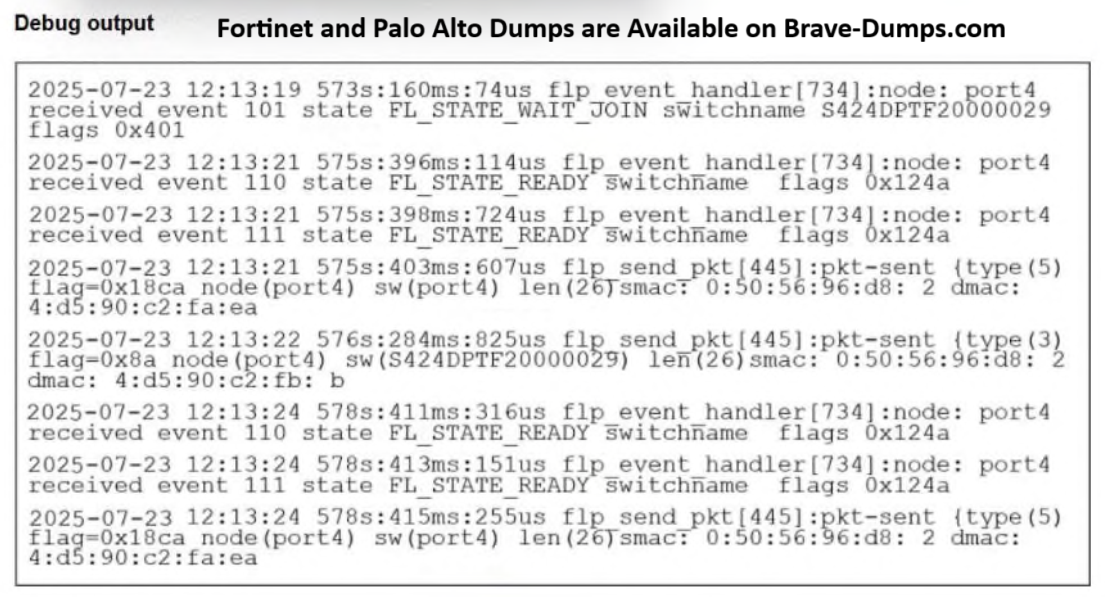
FortiSwitch is in a waiting state to join the stack group as the logs clearly displays "FL_STATE_WAIT_JOIN switchname S424DPTF20000029 flags 0x401".
The log entry: 2025-07-23 12:13:19 573s:160ms:14us flp_event_handler[734]:node: port4 received event 101 state FL_STATE_WAIT_JOIN switchname S424DPTF20000029 flags 0x401.
The key state here is FL_STATE_WAIT_JOIN. This explicitly indicates that the FortiSwitch (connected on port 4) is in a waiting state, specifically to join the FortiLink stack managed by the FortiGate. The number 101 is the event ID corresponding to this action.
B. FortiSwitch is sending FortiLink heartbeats to FortiGate. The log clearly displays the FL_STATE_WAIT_JOIN status, indicating the switch is awaiting successful integration into the FortiLink stack. Furthermore, the repeated occurrence of event ID 110 while the switch is in the FL_STATE_READY status confirms that the device is actively transmitting FortiLink heartbeat messages, which are essential for maintaining the connection and operational status between the FortiSwitch and the managing FortiGate device.
PAGE: 399
-
Justin Simard
2026-01-27 22:18:47
I think A is misleading. While the top message shows the switch is in a waiting state, the rest of the output would not occur until if it was still waiting.
Selected Answers: B, C
Its demonstrated in the FS 7.6 study guide pg. 398 & 410 in the FS 7.2 Study Guide
THE EXACT LINE THAT PROVES MY POINT:You can see the changes of the state from WAIT_CONN to
STATE_READY
DIRECT QUOTE FROM PG 398: On FortiGate, you can enable the debug of the fortilinkd process for monitoring and troubleshooting the
discovery of FortiSwitch devices.
When FortiGate discovers a new FortiSwitch, the debug output shows the FortiSwitch serial number, as well
as the FortiGate port that received the FortiLink frames that triggered the switch discovery.
FortiGate uses the switch port information included in the FortiLink discovery frames to build the switch
faceplate image shown on the GUI. The output on this slide shows that FortiGate discovered a FortiSwitch VM
that is authorized by FortiGate through port4. You can see the changes of the state from WAIT_CONN to
STATE_READY
Selected Answers: B, C
When FortiGate discovers a new FortiSwitch, the debug output shows the FortiSwitch serial number, as well
as the FortiGate port that received the FortiLink frames that triggered the switch discovery.
FortiGate uses the switch port information included in the FortiLink discovery frames to build the switch
faceplate image shown on the GUI. The output on this slide shows that FortiGate discovered a FortiSwitch VM
that is authorized by FortiGate through port4. You can see the changes of the state from WAIT_CONN to
STATE_READY.
Page 399
After you authorize a switch and it comes online, the switch starts sending FortiLink heartbeats to FortiGate
every 3 seconds. FortiGate then acknowledges the heartbeats by sending a reply to the switch. The debug
output for the fortilinkd process will also show these heartbeats.
Refer to the exhibit. Which two statements best describe what is displayed in the FortiLink debug output shown in the exhibit? (Choose two answers)
Brave-Dump Clients Votes