View all questions & answers for the NSE 5 - FortiSwitch 7.6 Administrator Exam Materials exam
NSE 5 - FortiSwitch 7.6 Administrator Exam Materials-Question 46 Discussion
Comments
Selected Answers: A
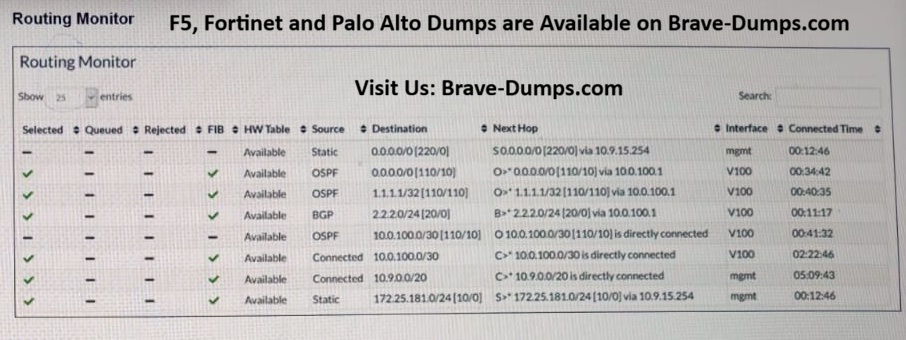
The correct answer is A. The routes are excluded from the FIB because more preferred routes exist for the same destinations.
1. The static default route (0.0.0.0/0) with administrative distance 220 is less preferred than the OSPF default route (administrative distance 110).
2. The OSPF route to 10.0.0.0/30 (administrative distance 110) is less preferred than the connected route to the same network (administrative distance 0 or 1).
Since these routes are not selected as the best paths, they are not installed in the FIB.
At first glance, the FortiSwitch routing table displays the same standard information found in other routing tables. One difference, however, is the presence of the Selected, Queued, Rejected, HW Table, and FIB columns, which are explained next:
Selected: indicates whether the route is the best route for the destination network.
Queued: indicates whether the route is waiting to be installed in the hardware routing table. Routes are first queued before being installed in the hardware routing table. This process usually happens very fast.
Rejected: indicates routes that are not supported and therefore, are rejected by FortiSwitch.
FIB: indicates routes that are installed in the forwarding information base (FIB). Like FortiGate, FortiSwitch maintains a FIB, which is composed of the best (or selected) connected, static and dynamic routes. Note the use of best. This is because, like FortiGate, not all routes are installed in the FortiSwitch FIB. Only the best routes per destination network are .
HW Table: indicates which routes in the FIB are installed in the hardware routing table. FortiSwitch looks up the hardware routing table first and, if there is no match, tries the FIB. Hardware-based routing is done when FortiSwitch uses routes in the hardware routing table, which are loaded in the ASIC. Software-based routing is done when FortiSwitch uses the routes in the FIB, which are loaded in the kernel.
PAGE: 383 | FORTISWITCH 7.6 ADMIN GUIDE
Refer to the exhibit. Two routes in the routing monitor are marked as available but are not installed in the forwarding information base (FIB). Which statement correctly explains why the routes have this status? (Choose one answer)
Brave-Dump Clients Votes