View all questions & answers for the Implementing Cisco Enterprise Network Core Technologies (350-401 ENCOR) Exam Materials exam
Implementing Cisco Enterprise Network Core Technologies (350-401 ENCOR) Exam Materials-Question 64 Discussion
Comments
Selected Answers: No answers selected
-
Brave-Dumps.com Admin
2026-08-16 23:22:55
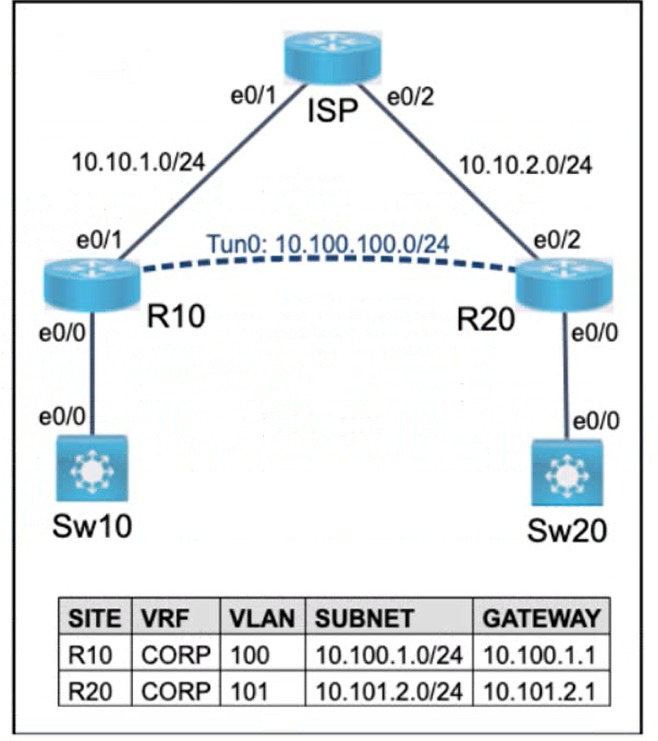
You will only have access to the devices highlighted in blue/turquoise (on this topology all devices are blue/turquoise so you will be able to access all), Devices shown in gray, will not be accessible (some other topologies contain gray)
Selected Answers: No answers selected
R10# configure terminal
R10(config)# interface Tunnel0
R10(config-if)# vrf forwarding CORP
R10(config-if)# ip address 10.100.100.1 255.255.255.0 (will need to be reconfigured)
R10(config-if)# tunnel protection ipsec profile <PROFILE_NAME> (Make sure to put the preconfigured Profile)
R10(config-if)# end
-------------
R20# configure terminal
R20(config)# interface Tunnel0
R20(config-if)# vrf forwarding CORP
R20(config-if)# ip address 10.100.100.2 255.255.255.0 (will need to be reconfigured)
R20(config-if)# tunnel protection ipsec profile <PROFILE_NAME> (Make sure to put the preconfigured Profile)
R20(config-if)# end
NOTE: Both the Tunnel Source and Destination IP Address will remain after configuring the CORP VRF on the Tunnel.
Guidelines
This is a lab item in which tasks will be performed on virtual devices.
Tasks
The operations team started configuring network devices for a new site. R10 and R20 are preconfigured with the CORP VRF. R10 has network connectivity to R20. Complete the configurations to achieve:
Answers:
R10
R10>en
R10#config t
R10(config)#no router ospf 100
R10(config)#router ospf 100 vrf CORP
R10(config-router)#router-id 10.10.10.10
R10(config-router)#exit
R10(config)#crypto keyring test vrf CORP
R10(conf-keyring)#pre-shared-key address 10.10.2.1 0.0.0.0 key cisco
R10(conf-keyring)#exit
R10(config)#interface Ethernet0/1
R10(config-if)# no sh
R10(config-if)#vrf forwarding CORP
R10(config-if)#ip address 10.10.1.1 255.255.255.0
R10(config-if)#ip ospf network point-to-point
R10(config-if)#ip ospf 100 area 0
R10(config-if)#interface Tunnel0
R10(config-if)#tunnel vrf CORP
####"tunnel protection ipsec profile MyProfile": This command assumes the profile name is “MyProfile.” During the exam, remember to use “show run | sec profile” to verify whether the existing in the pre-configuration is indeed “MyProfile.” If it is, proceed with the configuration using this command; if not, replace “MyProfile” with the specific profile name found.
R10(config-if)#tunnel protection ipsec profile MyProfile
R10(config-if)#end
R10#wr
R20
R20>en
(Invalid number of answers)R20#config t
R20(config)#no router ospf 100
R20(config)#router ospf 100 vrf CORP
R20(config-router)#router-id 20.20.20.20
R20(config-router)#exit
R20(config)#crypto keyring test vrf CORP
R20(conf-keyring)#pre-shared-key address 10.10.1.1 0.0.0.0 key cisco
R20(conf-keyring)#exit
R20(config)#interface Ethernet0/2
R20(config)#no sh
R20(config-if)#vrf forwarding CORP
R20(config-if)#ip address 10.10.2.1 255.255.255.0
R20(config-if)#ip ospf network point-to-point
R20(config-if)#ip ospf 100 area 0
R20(config-if)#interface Tunnel0
R20(config-if)#tunnel vrf CORP
####"tunnel protection ipsec profile MyProfile": This command assumes the profile name is “MyProfile.” During the exam, remember to use “show run | sec profile” to verify whether the existing in the pre-configuration is indeed “MyProfile.” If it is, proceed with the configuration using this command; if not, replace “MyProfile” with the specific profile name found.
R20(config-if)#tunnel protection ipsec profile MyProfile
R20(config-if)#end
R20#wr
Brave-Dump Clients Votes