View all questions & answers for the Implementing Cisco Enterprise Network Core Technologies (350-401 ENCOR) Exam Materials exam
Implementing Cisco Enterprise Network Core Technologies (350-401 ENCOR) Exam Materials-Question 69 Discussion
Comments
Selected Answers: No answers selected
Guidelines
This is a lab item in which tasks will be performed on virtual devices.
1. Refer to the Tasks tab to view the tasks for this lab item.
2. Refer to the Topology tab to access the device console(s) and perform the tasks.
3. Console access is available for all required devices by clicking the device icon or using the tab(s) above the console window.
4. All necessary preconfigurations have been applied.
5. Do not change the enable password or hostname for any device.
6. Save your configurations to NVRAM before moving to the next item.
7. Click Next at the bottom of the screen to submit this lab and move to the next question.
8. When Next is clicked, the lab closes and cannot be reopened.
Tasks
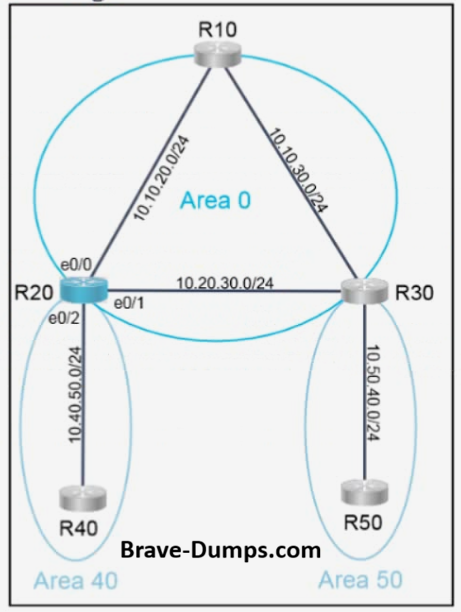
OSPF is preconfigured on all devices except R20. Configure R20 to complete these tasks:
Task 1
Configure OSPF according to the topology using these requirements:
- Use Process ID 200.
- Use Loopback0 for the Router ID.
- Advertise all networks into OSPF.
Use network statements under the OSPF process to accomplish this task.
Task 2
Configure a /17 summary route for Area 40.
Answers:
R20
R20>en
R20#
R20#show running-config interface Loopback0
Building configuration...
Current configuration : 65 bytes
!
interface Loopback0
ip address 10.0.1.20 255.255.255.255
R20#config t
R20(config)#router ospf 200
R20(config-router)#router-id 20.20.20.20
(Invalid number of answers)R20(config-router)#network 20.20.20.20 0.0.0.0 area 0
R20(config-router)#network 10.10.20.0 0.0.0.255 area 0
R20(config-router)#network 10.20.30.0 0.0.0.255 area 0
R20(config-router)#network 10.40.50.0 0.0.0.255 area 40
R20(config-router)#area 40 range 10.40.0.0 255.255.128.0
R20(config-router)#end
R20#wr
Brave-Dump Clients Votes