View all questions & answers for the Implementing Cisco Enterprise Network Core Technologies (350-401 ENCOR) Exam Materials exam
Implementing Cisco Enterprise Network Core Technologies (350-401 ENCOR) Exam Materials-Question 288 Discussion
Comments
Selected Answers: No answers selected
in this case do we need to add the command tunnel vrf FINANCE as now the e0/0 on R22 in the underlay path and the vrf need to sperate between underlay traffic through ISP network and overlay through Tun0
so we need to use the Front door VRF concept
or you just remove e0/0 from vrf and it will be the same like lab14 without any issues
Guidelines
This is a lab item in which tasks will be performed on virtual devices.
• Refer to the Tasks tab to view the tasks for this lab item.
• Refer to the Topology tab to access the device console(s) and perform the tasks.
• Console access is available for all required devices by clicking the device icon or using
the tab(s) above the console window.
• All necessary preconfigurations have been applied.
• Do not change the enable password or hostname for any device.
• Save your configurations to NVRAM before moving to the next item.
• Click Next at the bottom of the screen to submit this lab and move to the next question.
• When Next is clicked, the lab closes and cannot be reopened.
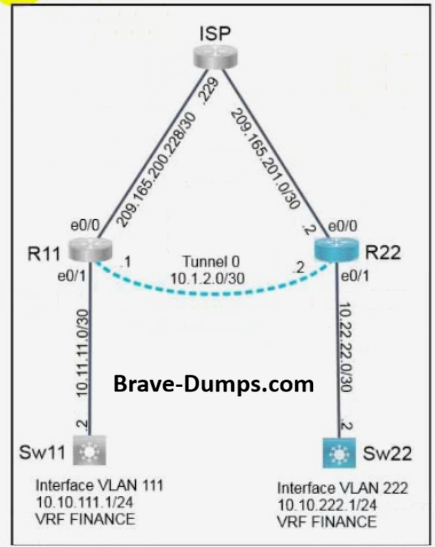
A colleague started configuring a new network. All configurations on R11
are complete and communication between R11 and R22 is functional.
Complete the configurations on R22 for the tasks below.
Task 1
Extend the FINANCE VRF between R11 and R22 using Tunnel 0.
Task 2
Complete the FINANCE VRF configuration on R22 and configure static
routing so that traffic between VLAN 111 and VLAN 222 uses Tunnel 0
exclusively.
Note: Sw22 can be used to validate traffic flow.
Answers
R22:
R22>en
(Invalid number of answers)R22#config t
R22(config)#int e0/0
R22(config-if)#vrf forwarding FINANCE
R22(config-if)#ip add 209.165.201.2 255.255.255.252
R22(config-if)#no shutdown
R22(config-if)#exit
R22(config)#int e0/1
R22(config-if)#vrf forwarding FINANCE
R22(config-if)#ip add 10.22.22.1 255.255.255.252
R22(config-if)#no shutdown
R22(config-if)#exit
R22(config)#int tun0
R22(config-if)#vrf forwarding FINANCE
R22(config-if)#ip add 10.1.2.2 255.255.255.252
R22(config-if)#tunnel source 209.165.201.2
R22(config-if)#tunnel destination 209.165.200.230
R22(config-if)#no shutdown
R22(config-if)#exit
R22(config)#ip route vrf FINANCE 10.10.111.0 255.255.255.0 10.1.2.1
R22(config)#end
R22#wr
Brave-Dump Clients Votes