Implementing Cisco Enterprise Advanced Routing and Services (300-410 ENARSI) Exam Materials-Question 225 Discussion
Comment Image Comment Image Comment Image

Guidelines

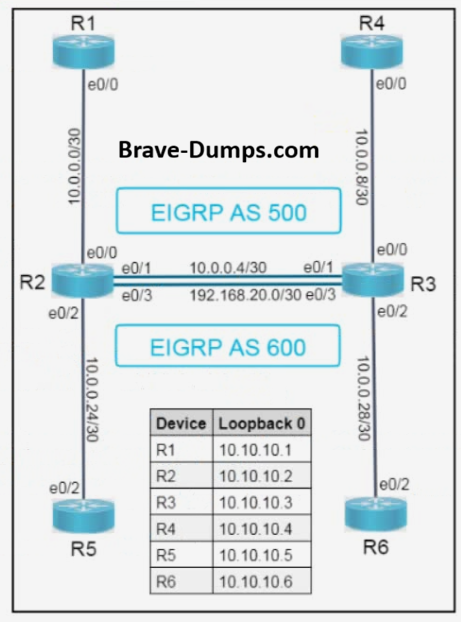
Please use the "Tasks" and "Topology" tabs to complete this lablet.


Complete the tasks below:

Task 1

Use the predefined Sales and Admin VRFs (interfaces configured) to complete the EIGRP configurations on R2 and R3 using these parameters:

  • Use EIGRP process 10
  • Do not use MPLS
  • The Sales VRF resides in AS 500
  • The Admin VRF resides in AS 600
  • R2 and R3 must establish EIGRP adjacencies in their respective VRFs to route traffic.
  • R3 (VRF Sales) and R4 (Non-VRF) must establish an EIGRP adjacency to route traffic.

Task 2

There is packet loss in the Sales VRF when R1 pings R4's Loopback0. Resolve the issue and confirm these facts:

  • R1 (Non-VRF) and R2 (VRF Sales) must establish an EIGRP neighbor relationship in AS500.
  • R1 and R4 should advertise and ping each other's Loopback0 in the Sales VRF.

Note: Disable automatic summarization in EIGRP on all routers. Do not configure VRFs on R1, R4, R5, and R6.

ِAnswers

 
R1
en
conf t
router eigrp 500
 network 10.0.0.0 0.0.0.3
 network 10.10.10.1 0.0.0.0
 no auto-summary
end
wr

R2
en
conf t
router eigrp 10
 address-family ipv4 vrf Sales
  network 10.0.0.0 0.0.0.3
  network 10.0.0.4 0.0.0.3
  autonomous-system 500
  no auto-summary
 exit-address-family
 address-family ipv4 vrf Admin
  network 10.0.24.0 0.0.0.3
  network 192.168.20.0 0.0.0.3
  autonomous-system 600
  no auto-summary
 exit-address-family
end
wr

R2
en
conf t
router eigrp 10
 address-family ipv4 vrf Sales
  network 10.0.0.0 0.0.0.3
  network 10.0.0.4 0.0.0.3
  autonomous-system 500
  no auto-summary
 exit-address-family
 address-family ipv4 vrf Admin
  network 10.0.24.0 0.0.0.3
  network 192.168.20.0 0.0.0.3
  autonomous-system 600
  no auto-summary
 exit-address-family
end
wr

R3
en
conf t
router eigrp 10
 address-family ipv4 vrf Sales
  network 10.0.0.4 0.0.0.3
  network 10.0.0.8 0.0.0.3
  autonomous-system 500
  no auto-summary
 exit-address-family
 address-family ipv4 vrf Admin
  network 192.168.20.0 0.0.0.3
  network 10.0.28.0 0.0.0.3
  autonomous-system 600
  no auto-summary
 exit-address-family
end
wr

R4
en
conf t
router eigrp 500
 network 10.0.0.8 0.0.0.3
 network 10.10.10.4 0.0.0.0
 no auto-summary
end
wr
(Invalid number of answers)

  • A.
  • B.
  • C.
  • D.
Correct Answer:

Brave-Dump Clients Votes


Comments


Anonymous User 2026-10-25 17:31:00

Selected Answers: No answers selected


I try to lab, R1 and R4 correct configuration but on the R2 and R3 is incorrect and I think this is a typo. The Autonomous-System configured only in the Address-Family configuration. Same answer on previous lab.

R2(config-router-af)#address-family ipv4 vrf Sales autonomous-system 500