View all questions & answers for the FCSS - Network Security 7.4 Support Engineer Exam Materials exam
FCSS - Network Security 7.4 Support Engineer Exam Materials - Question #48 Discussion
Community Explanations & Comments (1)
Brave-Dumps.com Admin
1 year ago
Selected: C, D, E
C, D and E confirmed as per study guide page 126
"The device has not been authorized on the root FortiGate yet."
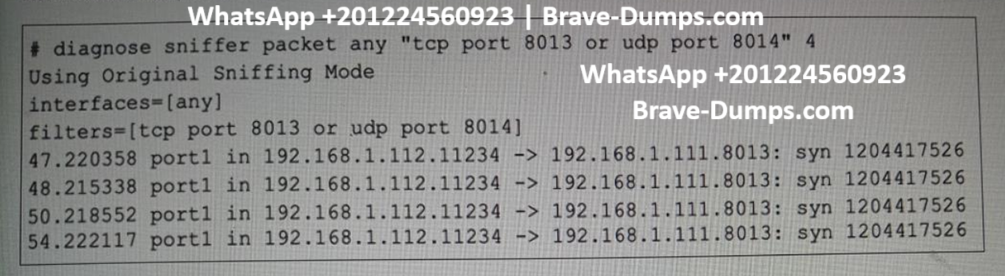
"TCP port 8013 is blocked. You can use the diagnose sniffer command to verify this."
"The Security Fabric Connection setting has not been enabled on the upstream FortiGate GUI (under Administrative Access)."
"The device has not been authorized on the root FortiGate yet."
"TCP port 8013 is blocked. You can use the diagnose sniffer command to verify this."
"The Security Fabric Connection setting has not been enabled on the upstream FortiGate GUI (under Administrative Access)."
Refer to the exhibit, which shows one way communication of the downstream FortiGate with the upstream FortiGate within a Security Fabric. What three actions must you take to ensure successful communication? (Choose three answers)
Brave-Dump Community Votes