View all questions & answers for the FCSS - SD-WAN 7.4 Architect Exam Materials exam
FCSS - SD-WAN 7.4 Architect Exam Materials - Question #35 Discussion
Community Explanations & Comments (1)
michael
1 year ago
Selected: B
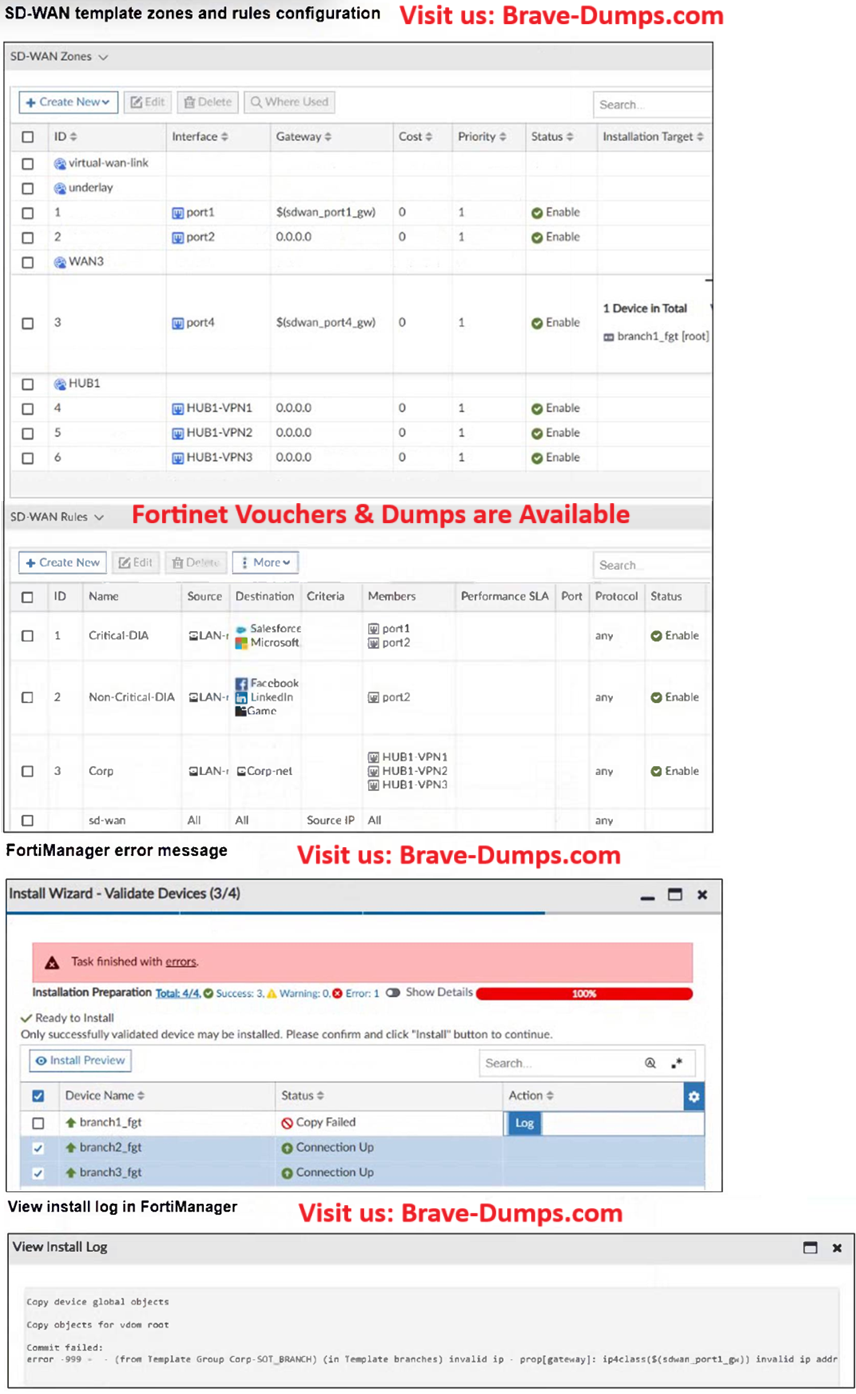
here the problem is sdwan_port1_gw invalid ip. there is no installation target for that. Can you review again?
Brave-Dumps.com Admin
1 year ago
Done, Thanks.
Refer to the exhibits. You use FortiManager to configure SD-WAN on three branch devices. When you install the device settings, FortiManager prompts you with the error "Copy Failed" for the device branch1_fgt. When you click the log button, FortiManager displays the message shown in the exhibit. Based on the exhibits, which statement best describes the issue and how you can resolve it? (Choose one answer)
Brave-Dump Community Votes