View all questions & answers for the Implementing Cisco Enterprise Advanced Routing and Services (300-410 ENARSI) Exam Materials exam
Implementing Cisco Enterprise Advanced Routing and Services (300-410 ENARSI) Exam Materials - Question #18 Discussion
Community Explanations & Comments (4)
Anonymous User
4 months ago
Selected: D
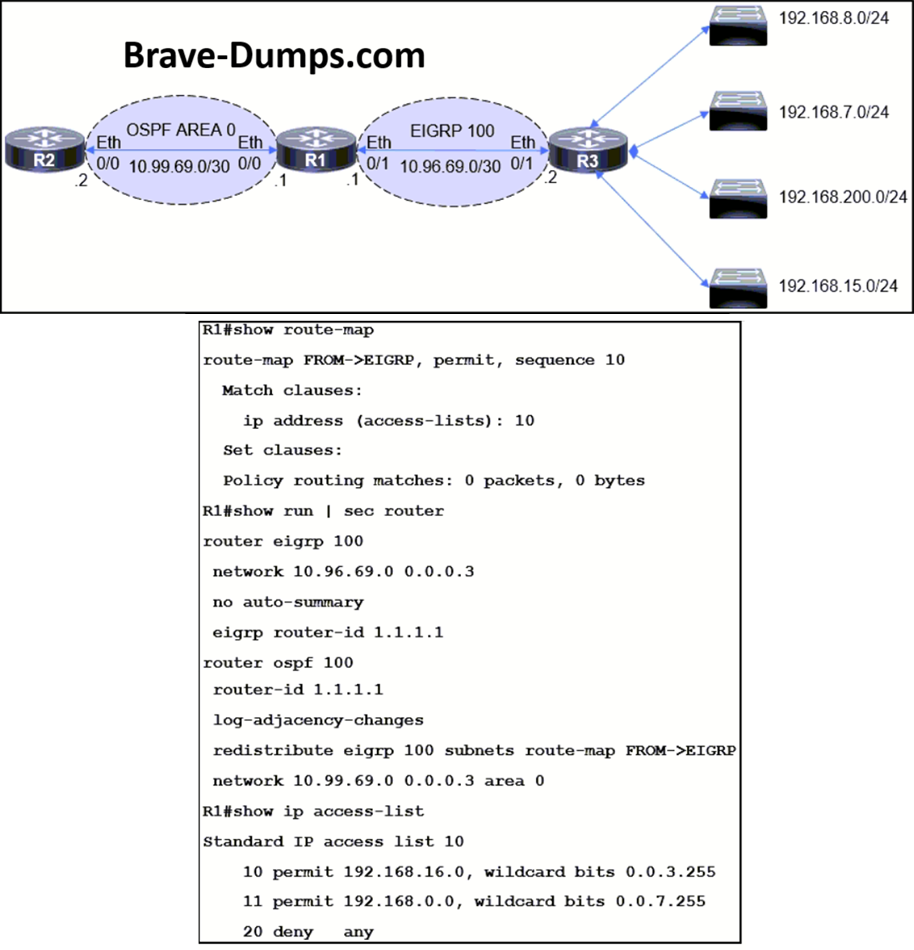
I do not understand why the question is saying R2 cannot access 192.168.7.0/24. The standard IP access list 10 include 11 permit 192.168.0.0, wildcard bits 0.0.7.255 should covers 192.168.7.0/24.
Brave-Dumps.com Admin
4 months ago
We edited the question to make it clearer, you are right. Based on the current ACL, 192.168.7.0/24 is already matched by 192.168.0.0 0.0.7.255, so R2 should be able to reach it. The real missing subnet is 192.168.15.0/24. The question appears to have an inconsistency, but among the given options, B is the expected answer because it matches both 192.168.7.0/24 and 192.168.15.0/24.
Brave-Dumps.com Admin
4 months ago
B is the correct one
Anonymous User
1 month ago
Selected: B
B is correct
Anonymous User
3 days ago
Selected: B
B, Correct answer
Refer to the exhibit. The engineer configured route redistribution in the network but soon received reports that R2 cannot access 192.168.7.0/24 and 192.168.15.0/24 subnets. Which configuration resolves the issue? (Choose one answer)
R1(config-std-nacl)#no 10 permit
R1(config-std-nacl)#no 11 permit
R1(config-std-nacl)#10 permit 192.168.0.0 0.0.3.255
R1(config-std-nacl)#11 permit 192.168.8.0 0.0.3.255
R1(config-std-nacl)#no 10 permit
R1(config-std-nacl)#no 11 permit
R1(config-std-nacl)#10 permit 192.168.4.0 0.0.3.255
R1(config-std-nacl)#11 permit 192.168.12.0 0.0.3.255
R1(config-std-nacl)#no 10 permit
R1(config-std-nacl)#no 11 permit
R1(config-std-nacl)#10 permit 192.168.0.0 0.0.3.255
R1(config-std-nacl)#11 permit 192.168.8.0 0.0.7.255
R1(config-std-nacl)#no 10 permit
R1(config-std-nacl)#no 11 permit
R1(config-std-nacl)#10 permit 192.168.0.0 0.0.7.255
R1(config-std-nacl)#11 permit 192.168.8.0 0.0.3.255
Brave-Dump Community Votes