View all questions & answers for the NSE 4 - FortiOS 7.6 Administrator Exam Materials exam
NSE 4 - FortiOS 7.6 Administrator Exam Materials - Question #57 Discussion
Community Explanations & Comments (5)
Jay gabasa
1 year ago
Selected: D
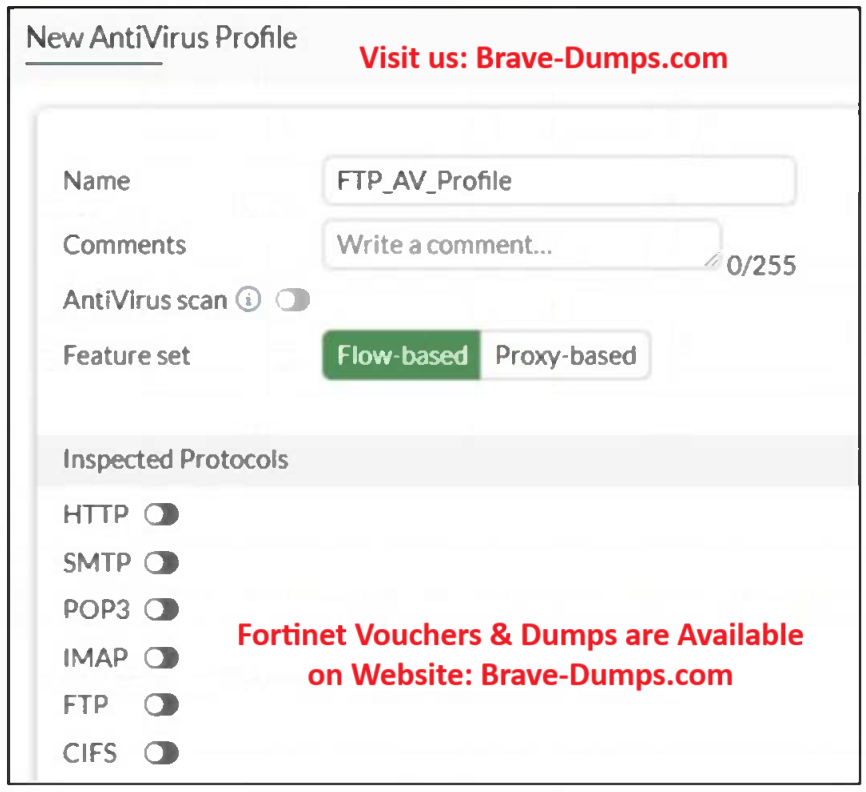
FortiOS only supports FTP and CIFS antivirus scanning in Proxy-based mode.
If the Feature Set is Flow-based, these options are disabled (grayed out).
Switching to Proxy-based immediately enables the antivirus toggle for FTP.
This is explicitly stated in:
FortiGate 7.6 Administration Guide → Security Profiles → Antivirus inspection modes
“For FTP, CIFS, and certain IM protocols, antivirus inspection is available only in proxy-based mode.”
If the Feature Set is Flow-based, these options are disabled (grayed out).
Switching to Proxy-based immediately enables the antivirus toggle for FTP.
This is explicitly stated in:
FortiGate 7.6 Administration Guide → Security Profiles → Antivirus inspection modes
“For FTP, CIFS, and certain IM protocols, antivirus inspection is available only in proxy-based mode.”
Jay gabasa
11 months ago
Selected: A
A is correct, tried this in a lab.
Brave-Dumps.com Admin
11 months ago
Thank you Jay!
Ijaz
10 months ago
Selected: A
Answer is A.
Enable one or more protocols for inspection, then enable AntiVirus scan for the selected protocols with a specified action.
https://docs.fortinet.com/document/fortigate/7.6.4/administration-guide/922096/inspection-mode-feature-comparison
Enable one or more protocols for inspection, then enable AntiVirus scan for the selected protocols with a specified action.
https://docs.fortinet.com/document/fortigate/7.6.4/administration-guide/922096/inspection-mode-feature-comparison
Jozef
7 months ago
Selected: A
Its option A - there is no protocol enabled for inspection
Ahmed El Hasseen El Tom El Shaikh Berair
3 months ago
Selected: A
57
Refer to the exhibit. Why is the Antivirus scan switch grayed out when you are creating a new antivirus profile for FTP? (Choose one answer)
Brave-Dump Community Votes