View all questions & answers for the NSE 4 - FortiOS 7.6 Administrator Exam Materials exam
NSE 4 - FortiOS 7.6 Administrator Exam Materials - Question #65 Discussion
Community Explanations & Comments (4)
Roberto Kevin Conopuma Damián
1 year ago
Selected: C
"Note that the ImplicitSD-WAN rule name does not appear in the SD-WAN Rule Name column. When the
traffic is steered according to this rule, the field remains empty." Study Guide Pag 449
traffic is steered according to this rule, the field remains empty." Study Guide Pag 449
Naiyar Rizvi
6 months ago
Selected: B
👉 SD-WAN Rule Name appears in logs ONLY when application-based steering is used
And for that:
Application Control profile must be applied
And for that:
Application Control profile must be applied
Anonymous User
6 months ago
Selected: C
Study Guide 7.6, p. 441
Ahmed El Hasseen El Tom El Shaikh Berair
3 months ago
Selected: C
65
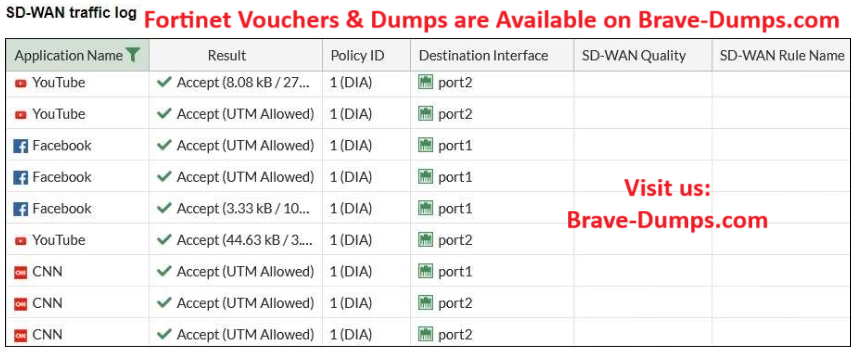
Refer to the exhibit. The administrator configured SD-WAN rules and set the FortiGate traffic log page to display SD-WAN-specific columns: SD-WAN Quality and SD-WAN Rule Name. FortiGate allows the traffic according to policy ID 1 placed at the top. This is the policy that allows SD-WAN traffic. Despite these settings, the traffic logs do not show the name of the SD-WAN rule used to steer those traffic flows. What could be the reason? (Choose one answer)
Brave-Dump Community Votes