View all questions & answers for the NSE 4 - FortiOS 7.6 Administrator Exam Materials exam
NSE 4 - FortiOS 7.6 Administrator Exam Materials - Question #73 Discussion
Community Explanations & Comments (14)
Nabeel Sameer
9 months ago
Selected: D
D is correct
Anonymous User
8 months ago
Selected: A
I think the answer to this should be A, this is as per Study Guide page 492.
"When HA override is disabled, the HA uptime has precedence over the priority setting. This means that if you
must manually fail over to a secondary device, you can do so by reducing the HA uptime of the primary
FortiGate. You can do this by running the diagnose sys ha reset-uptime command on the primary
FortiGate, which resets its HA uptime to 0."
"When HA override is disabled, the HA uptime has precedence over the priority setting. This means that if you
must manually fail over to a secondary device, you can do so by reducing the HA uptime of the primary
FortiGate. You can do this by running the diagnose sys ha reset-uptime command on the primary
FortiGate, which resets its HA uptime to 0."
Kacper
8 months ago
Selected: D
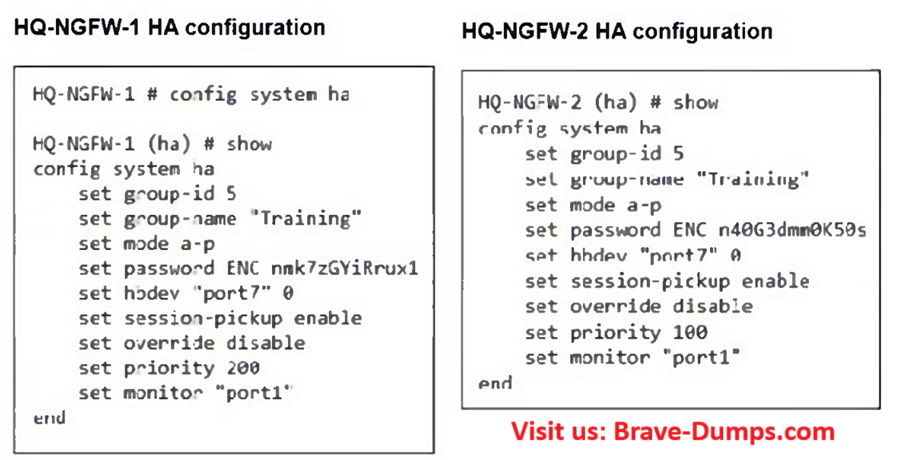
Correct answer is D, as number of monitored ports is a first tie breaker, then is HA uptime -> priority -> serial number.
onder
7 months ago
Selected: A
A correct
if you set port1 down, on both devices port1 will be down
if you set port1 down, on both devices port1 will be down
Anonymous User
6 months ago
Selected: D
D is Correct
Anonymous User
5 months ago
Selected: A
Should this be A? Since if you set the port1 to be down manually, the other FG port1 will also be down
Zeyad
4 months ago
Selected: A
A is correct , cause if set monitored interface "set down" it will sync the config with the secondary and will not failover
Anonymous User
4 months ago
Selected: D
its, D
Anonymous User
4 months ago
Selected: A
documentation clearly says if override is disabled, correct safe way to trigger a failover is to reset the uptime:
"diagnose sys ha reset-uptime"
putting a port into down state shouldn't be the way to trigger a failover imho.
"diagnose sys ha reset-uptime"
putting a port into down state shouldn't be the way to trigger a failover imho.
Julio Ricardo Inostroza Rivas
3 months ago
Selected: D
the correct answer is D read the question carefull
it say the administrator configure both FGW device same time the HA cluster. So, the HA Uptime must be de same. Also, the port monitoring is Port1 in both device.
To select the HA primary when OVERRIDE is disable (HA uptime preference over Priority) is the next:
Number of port monitoring >> HA uptime value >> Priority value >> Serial Number higher value
So, to test the failover the administrator must shutdown the Port1 in Primary HA device.
it say the administrator configure both FGW device same time the HA cluster. So, the HA Uptime must be de same. Also, the port monitoring is Port1 in both device.
To select the HA primary when OVERRIDE is disable (HA uptime preference over Priority) is the next:
Number of port monitoring >> HA uptime value >> Priority value >> Serial Number higher value
So, to test the failover the administrator must shutdown the Port1 in Primary HA device.
Ahmed El Hasseen El Tom El Shaikh Berair
3 months ago
Selected: A
73
Sidney
3 months ago
Selected: D
D
Anonymous User
2 months ago
Selected: A
A , BCS In a FortiGate HA cluster, when the parameter set override disable is active (which is the default behavior), the primary unit election follows this strict order of criteria
>> Connected Monitored Interfaces >> HA Uptime >> HA Priority >> Serial Number:
Because the cluster has been running and monitoring for one week, the HA uptime has now taken precedence over the priority setting (200 vs 100).
To manually force and safe failover to the secondary firewall (HQ-NGFW-2), the administrator must reduce or reset the uptime of the current primary.
>> Connected Monitored Interfaces >> HA Uptime >> HA Priority >> Serial Number:
Because the cluster has been running and monitoring for one week, the HA uptime has now taken precedence over the priority setting (200 vs 100).
To manually force and safe failover to the secondary firewall (HQ-NGFW-2), the administrator must reduce or reset the uptime of the current primary.
[email protected]
2 weeks ago
Selected: A
A is the correct way without bringing connected monitored port 1 down. we can verify HA failover.
If we go for disruptive way to bring down connected monitored port 1 down on HQ-NWFW-1. In such case D is correct. However, we should prefer answer A as best practice.
If we go for disruptive way to bring down connected monitored port 1 down on HQ-NWFW-1. In such case D is correct. However, we should prefer answer A as best practice.
Refer to the exhibits. An administrator configured both members of an HA cluster at the same time. After one week of monitoring, the administrator wants to verify the HA failover performance. How can the administrator force a failover? (Choose one answer)
Brave-Dump Community Votes