View all questions & answers for the NSE 6 - FortiManager 7.6 Administrator Exam Materials exam
NSE 6 - FortiManager 7.6 Administrator Exam Materials - Question #24 Discussion
Community Explanations & Comments (7)
Omar Ahmed ([email protected])
1 year ago
Selected: B
The error message clearly indicates:
"Mobile FortiToken FTFKMO84A9AC5C56D used by user local HR_user could not be found at device"
This means that the FortiToken being referenced in FortiManager does not exist on the target device (HQ-NGFW-1). FortiTokens must be physically present or registered on the FortiGate (HQ-NGFW-1) before they can be referenced in user configurations or pushed via FortiManager
"Mobile FortiToken FTFKMO84A9AC5C56D used by user local HR_user could not be found at device"
This means that the FortiToken being referenced in FortiManager does not exist on the target device (HQ-NGFW-1). FortiTokens must be physically present or registered on the FortiGate (HQ-NGFW-1) before they can be referenced in user configurations or pushed via FortiManager
Mohanad Salem
8 months ago
but the FortiToken its already exist on HQ-NGFW-1
Sean Foster
6 months ago
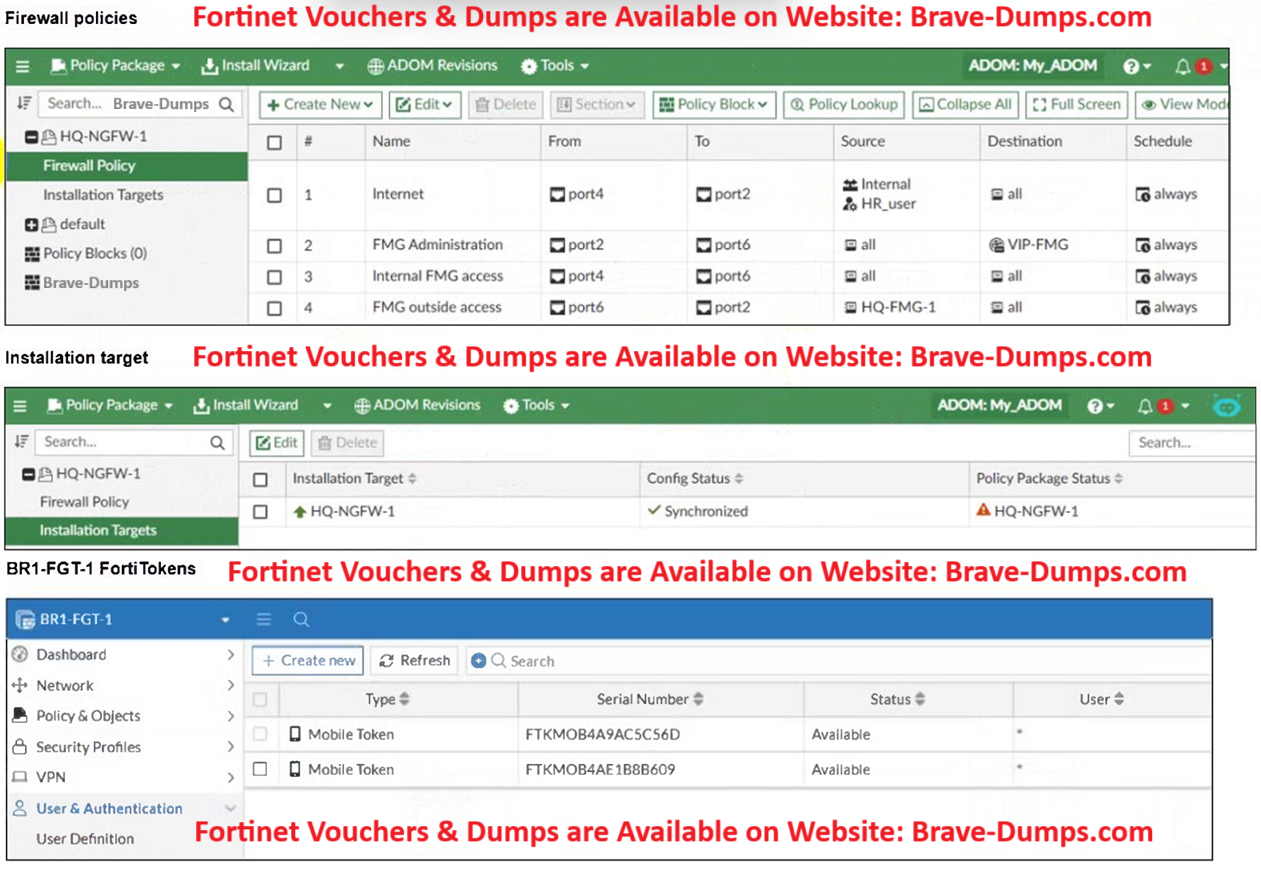
Mohanad Salem - It doesn't, the 2nd image shows BR1-FGT-1 not HQ-NGFW-1
eze
11 months ago
Selected: D
about the error:
Mobile FortiToken FTFKMO84A9AC5C56D used by user local HR_user could not be found at device
"user local", "FTKMOB4A9AC5C56D", id=5586, COMMIT FAIL - invalid value - prop[user fortitoken]:
Mobile FortiToken FTFKMO84A9AC5C56D used by user local HR_user could not be found at device
In the Fortigate the User no exist, exist only in FMG, the admin sould use device peer-mapping, so that this work correctly and this can create de user with its fortitoken.
Mobile FortiToken FTFKMO84A9AC5C56D used by user local HR_user could not be found at device
"user local", "FTKMOB4A9AC5C56D", id=5586, COMMIT FAIL - invalid value - prop[user fortitoken]:
Mobile FortiToken FTFKMO84A9AC5C56D used by user local HR_user could not be found at device
In the Fortigate the User no exist, exist only in FMG, the admin sould use device peer-mapping, so that this work correctly and this can create de user with its fortitoken.
eze
11 months ago
Selected: D
official guide of fortinet "FortiToken assignment requires that the local user exists on the target FortiGate."
"If the user does not exist, token deployment fails
"If the user does not exist, token deployment fails
Anonymous User
8 months ago
Selected: B
The Tokens the FMG is trying to push are different ones than the ones being present on the FGT.
Because the tokens do not exist on the FortiGate, the push failes.
Because the tokens do not exist on the FortiGate, the push failes.
Mehdi
7 months ago
Selected: B
it complains about Token not user, I'm amazed by some users no reading the question correctly! not rocket sci honestly
Sebastian Schewe
6 months ago
Selected: B
B, u cant FortiToken per-device mapping....
Anonymous User
6 months ago
Selected: B
Answer is B
The token referenced in the failure script is located on BR1-FGT-1 (check the 2nd image) Not HQ-NGFW-1 in the script.
The token referenced in the failure script is located on BR1-FGT-1 (check the 2nd image) Not HQ-NGFW-1 in the script.
Refer to the exhibits. An administrator needs to push a FortiToken Mobile to assign it to HR_user in the HQ-NGFW-1. However, when installing the policy package, they receive the following error message: Copy device global objects Vdom copy failed: error -999 - Copy objects for vdom root "firewall policy", "1", id=5532, COMMIT FAIL - invalid value - prop[user fortitoken]: Mobile FortiToken FTFKMO84A9AC5C56D used by user local HR_user could not be found at device "user local", "FTKMOB4A9AC5C56D", id=5586, COMMIT FAIL - invalid value - prop[user fortitoken]: Mobile FortiToken FTFKMO84A9AC5C56D used by user local HR_user could not be found at device Why is the administrator not able to install the FortiToken on the HQ-NGFW-1 firewall? (Choose one answer)
Brave-Dump Community Votes