View all questions & answers for the NSE 6 - FortiManager 7.6 Administrator Exam Materials exam
NSE 6 - FortiManager 7.6 Administrator Exam Materials - Question #26 Discussion
Community Explanations & Comments (4)
Omar Ahmed ([email protected])
1 year ago
Selected: A
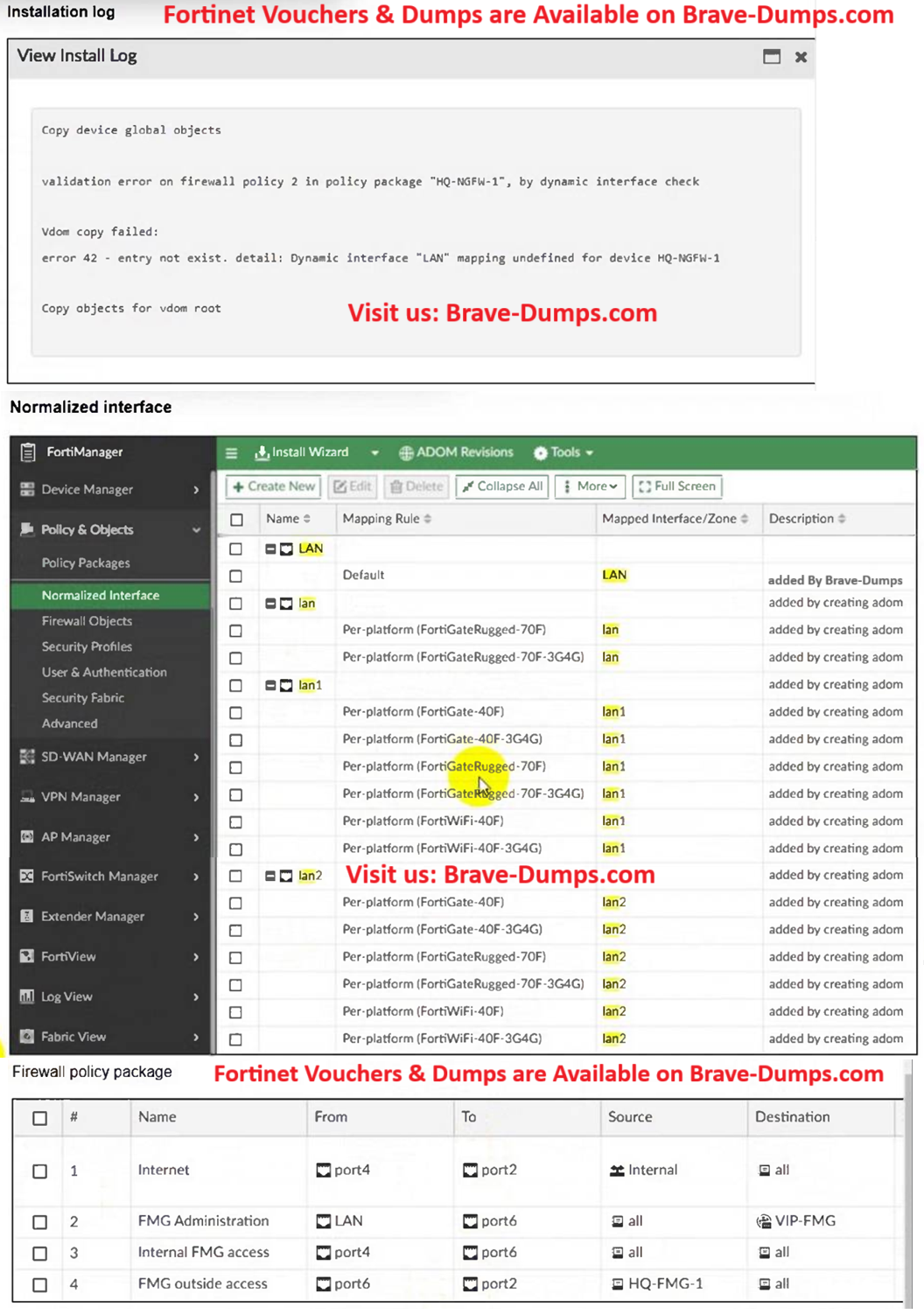
Per-Device Mapping in FortiManager allows you to:
Map logical interface names used in a policy package to physical interface names on a specific FortiGate device.
Keep using a shared policy package across different models without editing the base policy.
In this case, you can map:
LAN → lan1
Map logical interface names used in a policy package to physical interface names on a specific FortiGate device.
Keep using a shared policy package across different models without editing the base policy.
In this case, you can map:
LAN → lan1
Angelo Clemente
10 months ago
Selected: D
The error occurs because the policy references an interface named LAN, which does not exist on the FortiGateRugged-70F device. FortiManager cannot install a policy that uses an invalid interface name.
FortiGate models have specific interface names (e.g., port1, wan1, lan1), and these names vary by platform.
The FortiGateRugged-70F uses lan1 instead of a generic "LAN" interface name.
To resolve the error, you must update the policy to reference the correct interface name supported by the device.
FortiGate models have specific interface names (e.g., port1, wan1, lan1), and these names vary by platform.
The FortiGateRugged-70F uses lan1 instead of a generic "LAN" interface name.
To resolve the error, you must update the policy to reference the correct interface name supported by the device.
Anonymous User
6 months ago
Selected: A
A. Better choice
D could be an alternative but better choice in this case is A.
D could be an alternative but better choice in this case is A.
ALI HASAN
4 months ago
Selected: A
Why i believe A is correct:
while option D could also resolve the issue, however in this case your going to change the interface used in the policy, and if there are new Fortigate devices to be added with different models that uses the same policy, but have different interface naming (example: port1) its going to cause the same issue and will result in more administrative overhead.
but creating a per-device mapping for LAN interface, you don't need to change the interface on the policy, but change the interface mapping of LAN depending on the FortiGate devices in your environment, this would be more scalable solution and less overhead for the administrator.
while option D could also resolve the issue, however in this case your going to change the interface used in the policy, and if there are new Fortigate devices to be added with different models that uses the same policy, but have different interface naming (example: port1) its going to cause the same issue and will result in more administrative overhead.
but creating a per-device mapping for LAN interface, you don't need to change the interface on the policy, but change the interface mapping of LAN depending on the FortiGate devices in your environment, this would be more scalable solution and less overhead for the administrator.
Refer to the exhibits. An administrator must replace the source LAN interface in policy ID 2 on their FortiGateRugged-70F. However, when they try to install the policy package, they receive the error shown in the exhibit. What should the administrator do to resolve the error? (Choose one answer)
Brave-Dump Community Votes