View all questions & answers for the NSE 6 - FortiManager 7.6 Administrator Exam Materials exam
NSE 6 - FortiManager 7.6 Administrator Exam Materials - Question #30 Discussion
Community Explanations & Comments (6)
Saeed Abd El Halim Hamada
1 year ago
Selected: A
Correct Answer: A
Mahboab Ali Ghaleb
1 year ago
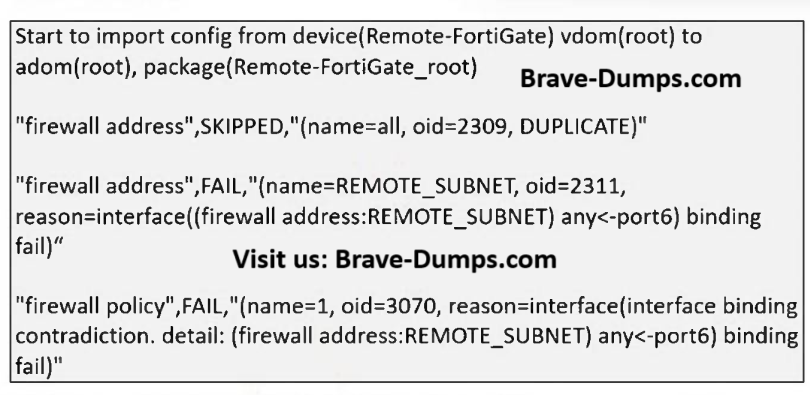
This is incorrect. FortiManager does support per-device mappings. The failure for REMOTE_SUBNET is a specific "interface binding fail," implying a conflict or misconfiguration, not a general lack of feature support.
Mahboab Ali Ghaleb
1 year ago
Selected: B
Based the first line there is a new Policy package created named (Remote-FortiGate_root).
Though, the imported REMOTE_SUBNET address and a firewall policy are failed, but the package container itself is created.
Though, the imported REMOTE_SUBNET address and a firewall policy are failed, but the package container itself is created.
eze
11 months ago
Selected: A
“During policy/package import, object binding mismatch results in FAIL and stops import.”
(Study Guide – sección Policy Package Import behavior)
(Study Guide – sección Policy Package Import behavior)
Angelo Clemente
10 months ago
Selected: D
When you import a policy package from a FortiGate device into FortiManager:
FortiManager parses the configuration and creates corresponding objects in the ADOM database.
If the imported policy references an address object (e.g., REMOTE_SUBNET) that does not already exist in the ADOM database, FortiManager automatically creates that object during the import process.
This behavior ensures that the imported policy remains consistent and functional within FortiManager.
FortiManager parses the configuration and creates corresponding objects in the ADOM database.
If the imported policy references an address object (e.g., REMOTE_SUBNET) that does not already exist in the ADOM database, FortiManager automatically creates that object during the import process.
This behavior ensures that the imported policy remains consistent and functional within FortiManager.
Anonymous User
8 months ago
Selected: B
Here you can see the exact same scenario:
https://community.fortinet.com/t5/FortiManager/Troubleshooting-Tip-FortiManager-import-fails-due-to-binding/ta-p/327485
Policy Pack is created, but the import has errors --> B is the right answer.
A is wrong, per Device mappings are supported for adress objects.
C is wrong, the import failed, the manager won't just change attributes. The error stems from contradicting values.
D is wrong, the object is only created when the import goes without fail. Because of the error, the object is not created.
https://community.fortinet.com/t5/FortiManager/Troubleshooting-Tip-FortiManager-import-fails-due-to-binding/ta-p/327485
Policy Pack is created, but the import has errors --> B is the right answer.
A is wrong, per Device mappings are supported for adress objects.
C is wrong, the import failed, the manager won't just change attributes. The error stems from contradicting values.
D is wrong, the object is only created when the import goes without fail. Because of the error, the object is not created.
Anonymous User
6 months ago
Selected: B
B=https://community.fortinet.com/t5/FortiManager/Troubleshooting-Tip-FortiManager-import-fails-due-to-binding/ta-p/327485
A is wrong, FM support Adresses Objects for mappings
A is wrong, FM support Adresses Objects for mappings
Refer to the exhibit. What can you conclude from the downloaded import report? (Choose one answer)
Brave-Dump Community Votes