View all questions & answers for the NSE 6 - Network Security 7.6 Support Engineer Materials exam
NSE 6 - Network Security 7.6 Support Engineer Materials - Question #115 Discussion
Community Explanations & Comments (4)
Hasan Ahmed
10 months ago
Selected: C, D
C and D are the correct answer
Fatma Salih
9 months ago
Selected: B, C
B is correct because the device has reached the amount of allowed ephemeral sessions so it will start dropping any sessions with incompete handshake
James
9 months ago
Selected: C, D
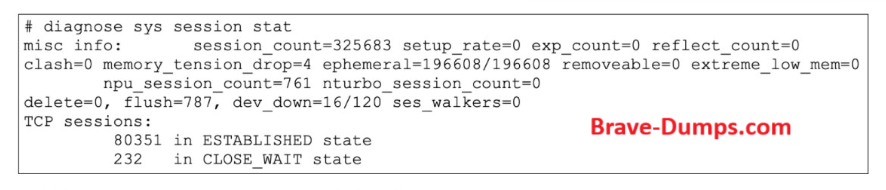
* memory_tension_drop=4
Sessions dropped due to memory tension. This happens before extreme low memory. FortiGate proactively removes sessions.
flush=787
Sessions are being actively flushed. This is not normal cleanup — it’s defensive behavior
Sessions dropped due to memory tension. This happens before extreme low memory. FortiGate proactively removes sessions.
flush=787
Sessions are being actively flushed. This is not normal cleanup — it’s defensive behavior
Anonymous User
6 months ago
Selected: C, D
C. Flushing sessions (High memory usage)
The Evidence: Look at the counter flush=787.
The Logic: When a FortiGate enters Conserve Mode (due to high memory usage), it starts a process called "session aggressive aging." The system proactively flushes (removes) sessions from the session table to free up memory. A non-zero flush count confirms this is happening.
D. Kernel memory allocation failures
The Evidence: Look at the counter memory_tension_drop=4.
The Logic: This specific counter increments when the FortiGate kernel attempts to allocate a new memory page for a session but fails because no memory is available. When this happens, the system is forced to drop or delete sessions to maintain basic system stability.
Why the other options are incorrect
A. Device has been down: The value dev_down=16/120 does not mean the FortiGate was "down" or offline. In this context, dev_down refers to internal session cleanup related to interfaces being brought down or changed within the last 120 seconds.
B. Dropping incomplete handshakes: While FortiGate does manage incomplete handshakes (syn-proxy/embryonic sessions), the diagnose sys session stat command doesn't indicate a mass drop for that reason here. The high flush and memory_tension_drop point directly to a memory resources issue, not a protocol/handshake issue.
The Evidence: Look at the counter flush=787.
The Logic: When a FortiGate enters Conserve Mode (due to high memory usage), it starts a process called "session aggressive aging." The system proactively flushes (removes) sessions from the session table to free up memory. A non-zero flush count confirms this is happening.
D. Kernel memory allocation failures
The Evidence: Look at the counter memory_tension_drop=4.
The Logic: This specific counter increments when the FortiGate kernel attempts to allocate a new memory page for a session but fails because no memory is available. When this happens, the system is forced to drop or delete sessions to maintain basic system stability.
Why the other options are incorrect
A. Device has been down: The value dev_down=16/120 does not mean the FortiGate was "down" or offline. In this context, dev_down refers to internal session cleanup related to interfaces being brought down or changed within the last 120 seconds.
B. Dropping incomplete handshakes: While FortiGate does manage incomplete handshakes (syn-proxy/embryonic sessions), the diagnose sys session stat command doesn't indicate a mass drop for that reason here. The high flush and memory_tension_drop point directly to a memory resources issue, not a protocol/handshake issue.
Refer to the exhibit. Partial output of diagnose sys session stat command is shown. An administrator has noticed unusual behavior from FortiGate. It appears that sessions are randomly removed. Which two reasons could explain this? (Choose two answers)
Brave-Dump Community Votes