View all questions & answers for the NSE 7 - Enterprise Firewall 7.6 Administrator Exam Materials exam
NSE 7 - Enterprise Firewall 7.6 Administrator Exam Materials - Question #17 Discussion
Community Explanations & Comments (7)
Hasan Ahmed
11 months ago
Selected: B
The correct answer is B
Brave-Dumps.com Admin
11 months ago
Why?
thaer saadi
10 months ago
Selected: B
the correct answer is B
Adam
9 months ago
Selected: C
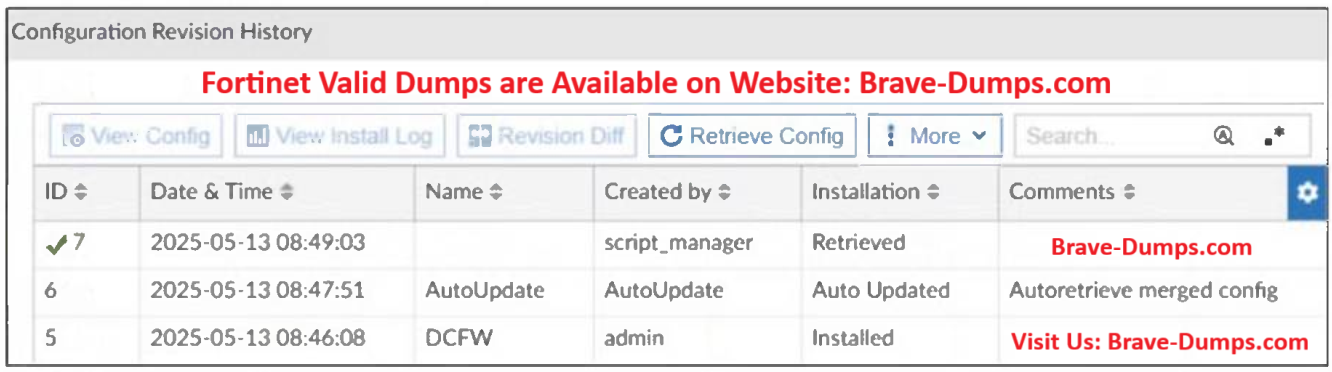
https://community.fortinet.com/t5/FortiManager/Technical-Tip-CLI-Script-behavior-to-run-in-FortiManager/ta-p/334459
"Since the script is installed directly on the FortiGate it will automatically perform a Retrieve back to FortiManager,"
We can see that running "Remote FortiGate Directly (via CLI)" from FortiManager generates similar entry in "Configuration Revision History" with Name = <null> & Created by = script_manager & Installation = Retrieved
"Since the script is installed directly on the FortiGate it will automatically perform a Retrieve back to FortiManager,"
We can see that running "Remote FortiGate Directly (via CLI)" from FortiManager generates similar entry in "Configuration Revision History" with Name = <null> & Created by = script_manager & Installation = Retrieved
Ahmed Elkabbany
7 months ago
Selected: C
page 45
Mohamed Gamal Mahmoud
7 months ago
Selected: C
Answer C
Nishan
6 months ago
Selected: A
A is correct :
Anonymous User
6 months ago
Selected: C
Enterprise_Firewall_7.6_Administrator_Study_Guide Page 45
Refer to the exhibit. A revision history window at the FortiManager device layer is shown. The IT team is trying to identify the administrator responsible for the most recent update to the FortiGate device database. What can the IT team conclude? (Choose one answer)
Brave-Dump Community Votes