View all questions & answers for the NSE 7 - FortiSASE 25 Enterprise Administrator Exam Materials exam
NSE 7 - FortiSASE 25 Enterprise Administrator Exam Materials - Question #4 Discussion
Community Explanations & Comments (3)
Brave-Dumps.com Admin
1 year ago
Selected: D
Confirmed by FortiSASE 25 Study Guide page 135
javaughn Bryan
11 months ago
Selected: D
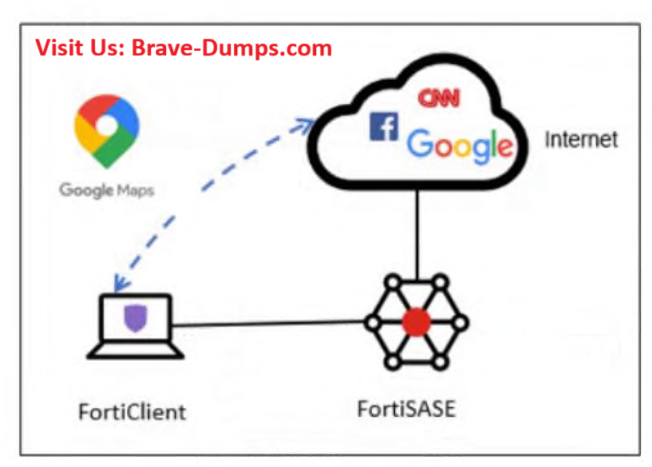
You can configure split-tunnel destinations in the endpoint profile to optimize FortiSASE bandwidth by excluding trusted traffic from flowing through FortiSASE secure internet access (SIA). Such traffic flows to the endpoint physical interface, bypassing FortiSASE.
You can configure split-tunnel destinations in the Steering bypass destinations table. For example, you can exclude applications like Microsoft Office 365, Microsoft Teams, Skype, GoToMeeting, Zoom, and so on. Steering bypass supports destinations defined by infrastructure, FQDN, local application types, and subnets.
PAGE 88: FORTISASE ENTERPRISE GUIDE
You can configure split-tunnel destinations in the Steering bypass destinations table. For example, you can exclude applications like Microsoft Office 365, Microsoft Teams, Skype, GoToMeeting, Zoom, and so on. Steering bypass supports destinations defined by infrastructure, FQDN, local application types, and subnets.
PAGE 88: FORTISASE ENTERPRISE GUIDE
Irving Batista
6 months ago
Selected: D
Steering bypass destinations: Can specify which traffic to bypass from the FortiSASE tunnel.
Page 89 FortiSASE_25_Enterprise_Administrator_Study_Guide
Page 89 FortiSASE_25_Enterprise_Administrator_Study_Guide
Refer to the exhibit. An organization must inspect all the endpoint internet traffic on FortiSASE, and exclude Google Maps traffic from the FortiSASE tunnel and redirect it to the endpoint physical interface. Which configuration must you apply to achieve this requirement? (Choose one answer)
Brave-Dump Community Votes