View all questions & answers for the NSE 7 - Security Operations 7.6 Architect Materials exam
NSE 7 - Security Operations 7.6 Architect Materials - Question #3 Discussion
Community Explanations & Comments (3)
Tshepo
10 months ago
Selected: A
Correct Answer: A. By tagging output or a workspace comment with the keyword Evidence
mohammed abdul salam
7 months ago
Selected: D
Playbook with “Save Execution Logs”
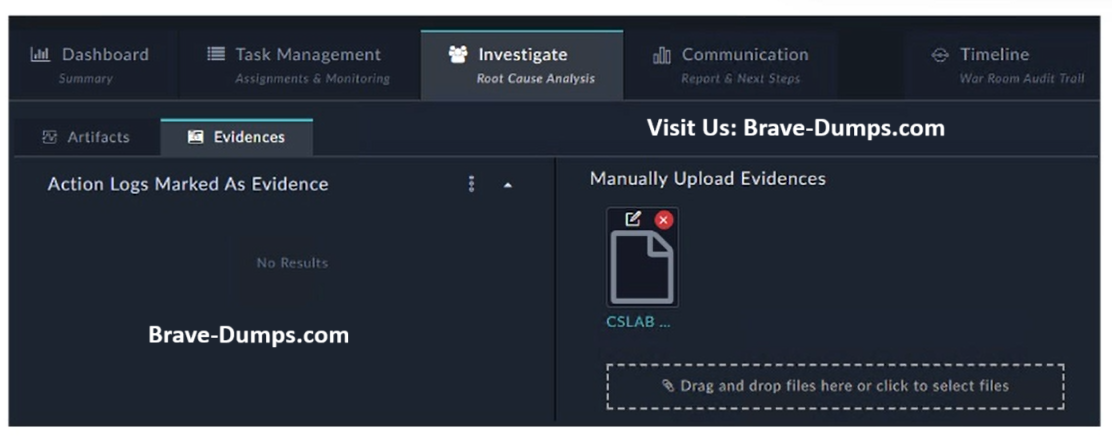
The section is called “Action Logs Marked As Evidence”
This means:
Evidence is automatically created from playbook execution logs
When Save Execution Logs is enabled → logs are stored as evidence
The section is called “Action Logs Marked As Evidence”
This means:
Evidence is automatically created from playbook execution logs
When Save Execution Logs is enabled → logs are stored as evidence
Anonymous User
6 months ago
Selected: A
Ref: https://docs.fortinet.com/document/fortisoar/7.6.5/user-guide/841633/war-room#Dashboard
###You can also add the Evidence tag, to mark the result as evidence, which then gets added to the Evidences tab within Investigate.###
###You can also add the Evidence tag, to mark the result as evidence, which then gets added to the Evidences tab within Investigate.###
Muhammad Faizan Yousaf
6 months ago
Agreed
Refer to the exhibit. How do you add a piece of evidence to the Action Logs Marked As Evidence area? (Choose one answer)
Brave-Dump Community Votes