● NSE 7 - LAN Edge 7.0 Exam Materials
Please note that the exam NSE 7 - LAN Edge 7.0 Exam" is no longer offered by Fortinet and is not available for booking through Pearson VUE, so we opened it on free view,
It has been replaced by the exam "NSE 6 - OT Security 7.6 Architect"
The new exam version is available on Brave-Dumps and can be purchased.
It has been replaced by the exam "NSE 6 - OT Security 7.6 Architect"
The new exam version is available on Brave-Dumps and can be purchased.
Question #11
Question #12
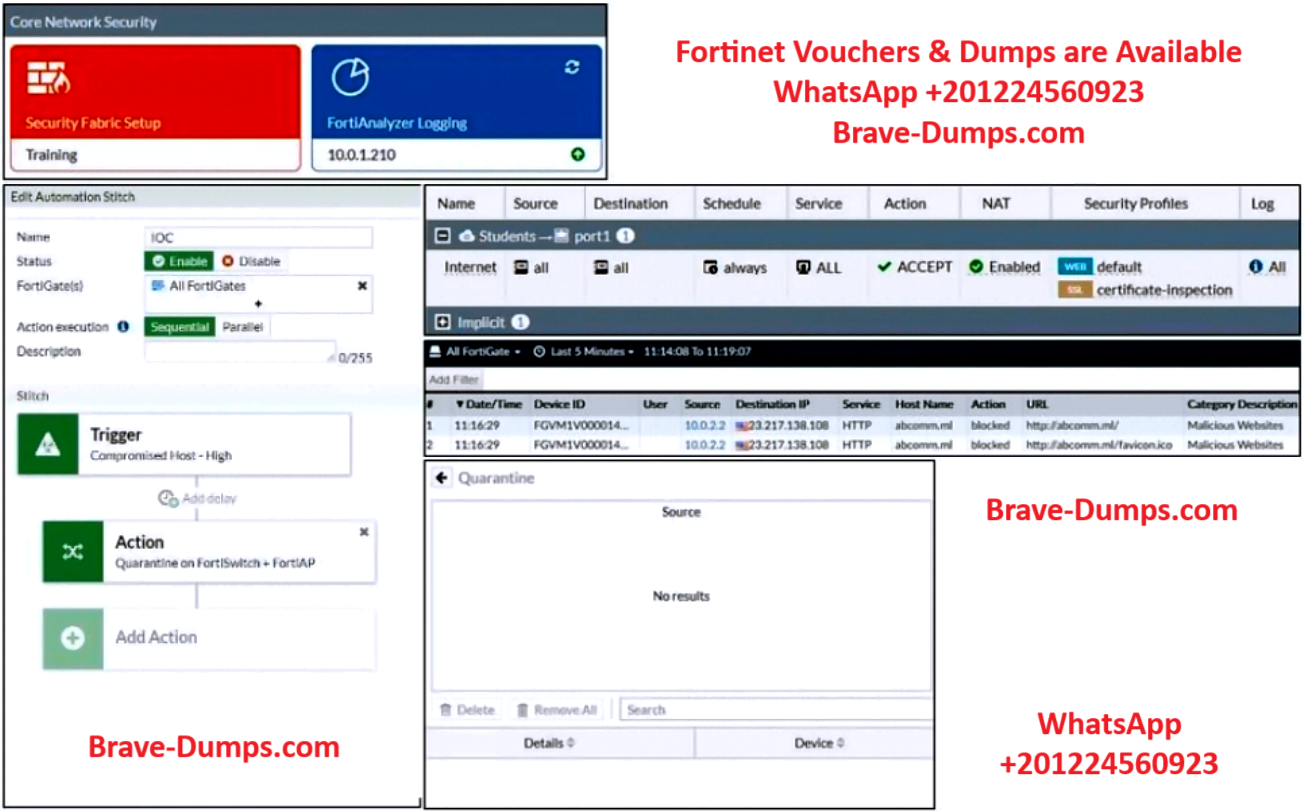
Refer to the exhibit.
Examine the FortiGate configuration, FortiAnalyzer logs, and FortiGate widget shown in the exhibit.
An administrator is testing the Security Fabric quarantine automation. The administrator added FortiAnalyzer to the Security Fabric, and configured an automation stitch to automatically quarantine compromised devices. The test device (10.0.2.1) is connected to a managed FortiSwitch device.
After trying to access a malicious website from the test device, the administrator verifies that FortiAnalyzer has a log for the test connection. However, the device is not getting quarantined by FortiGate, as shown in the quarantine widget.
Which two scenarios are likely to cause this issue?
(Choose two answers)
- A. The web filtering rating service is not working.
- B. FortiAnalyzer does not have a valid threat detection services license.
- C. The device does not have FortiClient installed.
- D. FortiAnalyzer does not consider the malicious website an indicator of compromise (IOC).
Question #13
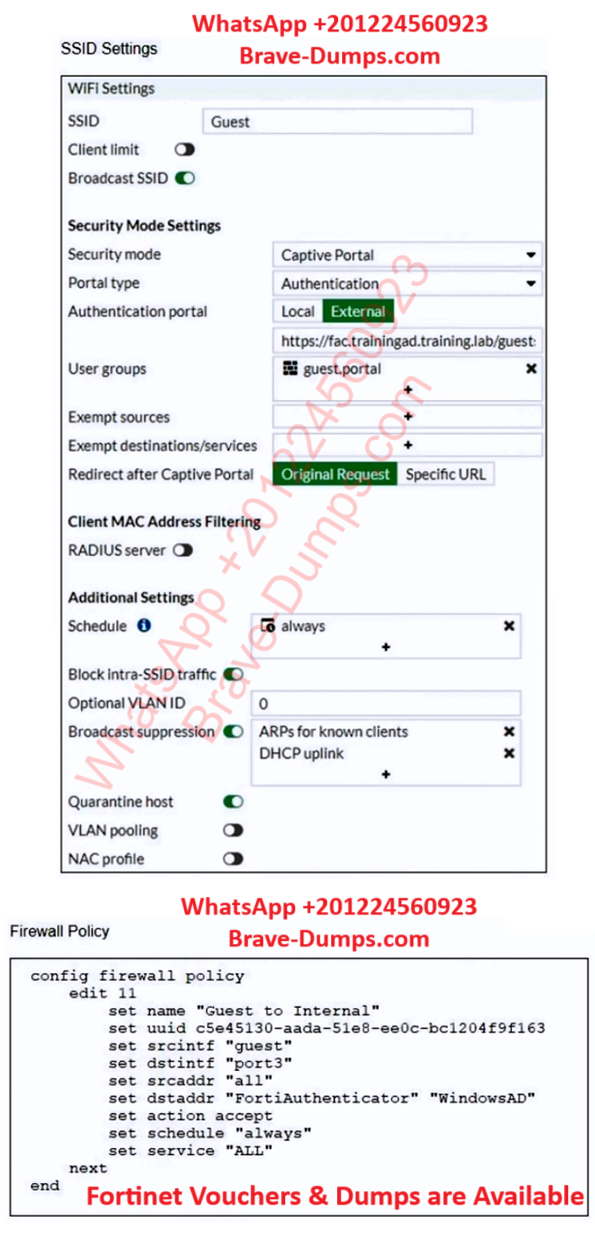
Refer to the exhibits.
Examine the firewall policy configuration and SSID settings.
An administrator has configured a guest wireless network on FortiGate using the external captive portal. The administrator has verified that the external captive portal URL is correct. However, wireless users are not able to see the captive portal login page.
Given the configuration shown in the exhibit and the SSID settings, which configuration change should the administrator make to fix the problem?
(Choose one answer)
- A. Disable the user group from the SSID configuration.
- B. Enable the captive-portal-exempt option in the firewall policy with the ID 11.
- C. Apply a guest.portal user group in the firewall policy with the ID 11.
- D. Include the wireless client subnet range in the Exempt Source section.
Question #14
Which three FortiOS tools can you use to troubleshoot RADIUS authentication issues? (Choose three answers)
- A. You can enable debug for the fssod process to view RADIUS authentication details.
- B. You can use the diagnose test authserver radius command to verify RADIUS server configuration, user credentials, and user group membership.
- C. You can check the Firewall Users widget to view the list of active RADIUS users.
- D. You can enable debug for the fnbamd process to view RADIUS authentication details.
- E. You can use the diagnose test application radiusd command to verify the RADIUS server configuration, user credentials, and user group membership.
Question #15
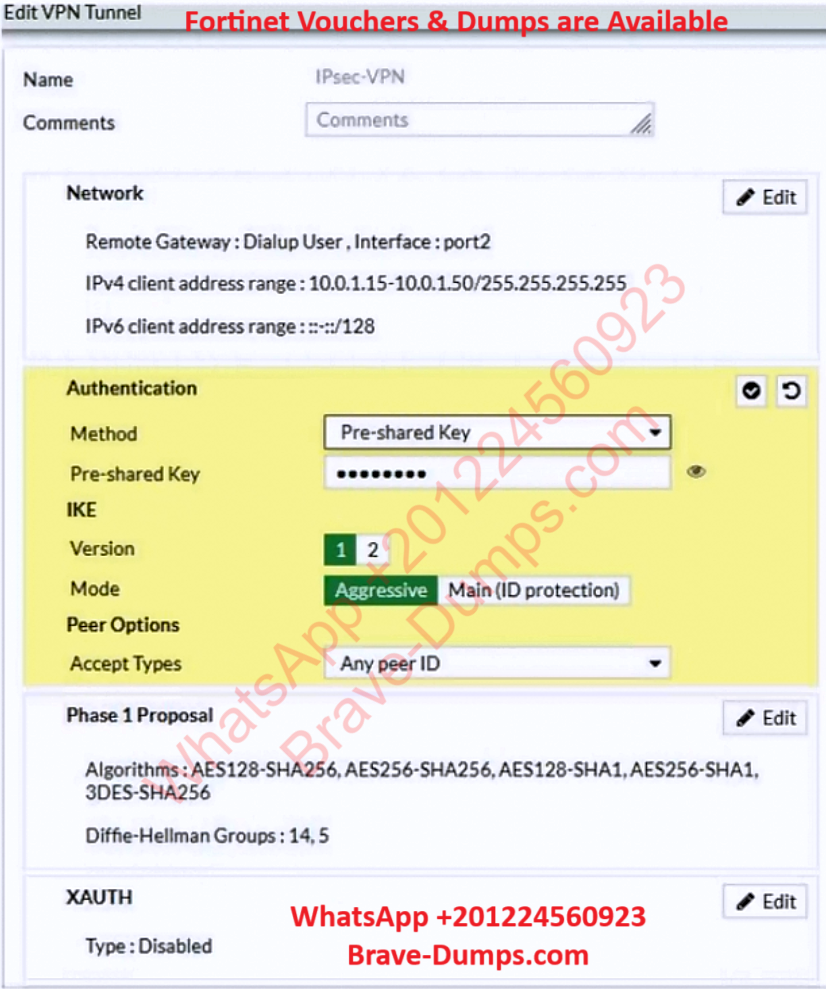
Refer to the exhibit.
Examine the IPsec VPN phase 1 configuration shown in the exhibit.
An administrator wants to use certificate-based authentication for an IPsec VPN user.
Which three configuration changes must you make on FortiGate to perform certificate-based authentication for the IPsec VPN user?
(Choose three answers)
- A. Create a PKI user for the IPsec VPN user, and then configure the IPsec VPN tunnel to accept the PKI user as peer certificate.
- B. In the Authentication section of the IPsec VPN tunnel, in the Method drop-down list, select Signature, and then select the certificate that FortiGate will use for IPsec VPN.
- C. In the IKE section of the IPsec VPN tunnel, in the Mode field, select Main (ID protection).
- D. Import the CA that signed the user certificate.
- E. Enable XAUTH on the IPsec VPN tunnel.
Question #16
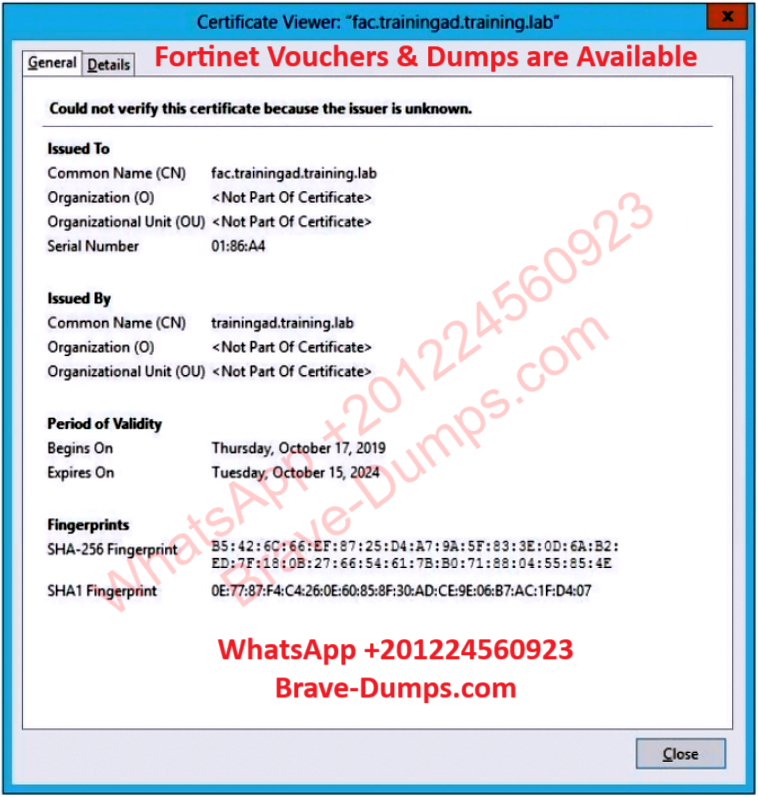
Refer to the exhibit showing certificate values.
Wireless guest users are unable to authenticate because they are getting a certificate error while loading the captive portal login page. This URL string is the HTTPS POST URL guest wireless users see when attempting to access the network using the web browser: https://fac.trainingad.training.com/guests/login/?
login&post=https://auth.trainingad.training.lab:1003/fgtauth&magic=000a038293d1f411&usermac=b8:27:eb:d8:50:02&apmac=70:4c:a5:9d:0d:28&apip=10.10.100.2&userip=10.0.3.1&ssid=Guest03&apname=PS221ETF18000148&bssid=70:4c:a5:9d:0d:30
Which two settings are the likely causes of the issue?
(Choose two answers)
- A. The external server FQDN is incorrect.
- B. The wireless user’s browser is missing a CA certificate.
- C. The FortiGate authentication interface address is using HTTPS.
- D. The user address is not in DDNS form.
Question #17
An administrator is deploying APs that are connecting over an IPsec network. All APs have been configured to connect to FortiGate manually. FortiGate can discover the Aps and authorize them. However, FortiGate is unable to establish CAPWAP tunnels to manage the APs.
Which configuration setting can the administrator perform to resolve the problem?.
(Choose one answer)
- A. Upgrade the FortiAP firmware image to ensure compatibility with the FortiOS version.
- B. Assign a custom AP profile for the remote APs with the set mpls-connection option enabled.
- C. Decrease the CAPWAP tunnel MTU size for APs to prevent fragmentation.
- D. Enable CAPWAP administrative access on the IPsec interface.
Question #18
Which two statements about the use of digital certificates are true? (Choose two answers)
- A. In a chain of trust, the root CA is signed by another certificate.
- B. To validate the signature on a certificate, an endpoint does not need to know the CA of that certificate.
- C. A chain of trust may include one or more intermediate CAs.
- D. An intermediate CA can sign other certificates.
Question #19
Which CLI command should an administrator use on FortiGate to view the RSSO authentication process in real time? (Choose one answer)
- A. diagnose debug application fnbamd -1
- B. diagnose debug application authd -1
- C. diagnose debug application radiusd -1
- D. diagnose debug application foauthd -1
Question #20
An administrator is deploying a new FortiGate device using zero-touch provisioning. Before deployment, the administrator added the FortiGate serial number on FortiManager and configured all the FortiGate settings.
FortiGate has a factory default configuration. However, when the administrator connects FortiGate to the network, FortiManager does not start the installation automatically.
Which two scenarios are likely to cause this issue?
(Choose two answers)
- A. The serial number added on FortiManager does not match the FortiGate serial number.
- B. The DHCP server that serves FortiGate is not configured with options 240 and 241.
- C. The pre-shared key set on FortiManager does not match the one set on FortiGate.
- D. Zero-touch provisioning is disabled on FortiManager.
To troubleshoot configuration push issues on a managed FortiSwitch, which FortiGate process should an administrator enable debug for? (Choose one answer)