● NSE 7 - LAN Edge 7.0 Exam Materials
Please note that the exam NSE 7 - LAN Edge 7.0 Exam" is no longer offered by Fortinet and is not available for booking through Pearson VUE, so we opened it on free view,
It has been replaced by the exam "NSE 6 - OT Security 7.6 Architect"
The new exam version is available on Brave-Dumps and can be purchased.
It has been replaced by the exam "NSE 6 - OT Security 7.6 Architect"
The new exam version is available on Brave-Dumps and can be purchased.
Question #51
Question #52
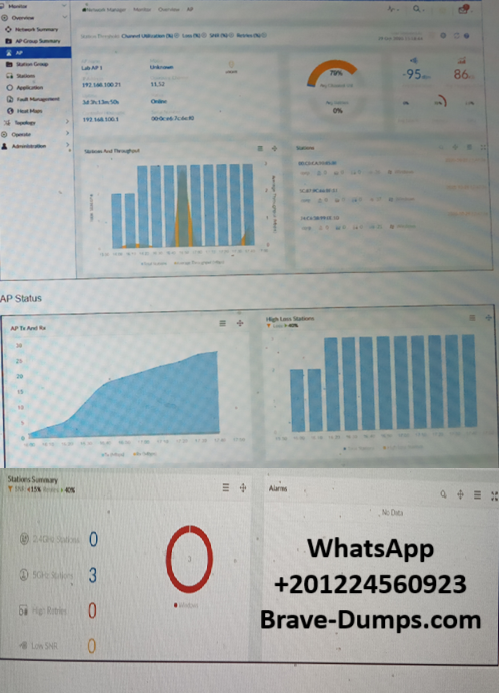
Refer to the exhibits showing AP monitoring information
The exhibits show the status of an AP in a small office building. The building is located at the edge of a campus, and users are reporting issues with wireless network performance.
Which configuration change would best improve the wireless network performance?
(Choose one answer)
- A. Enable band steering on the AP
- B. Disable lower data rates on the 5 GHz interface
- C. Select an alternative channel for the 5 GHz interface
- D. Relocate the AP to be closer to the clients
Question #53
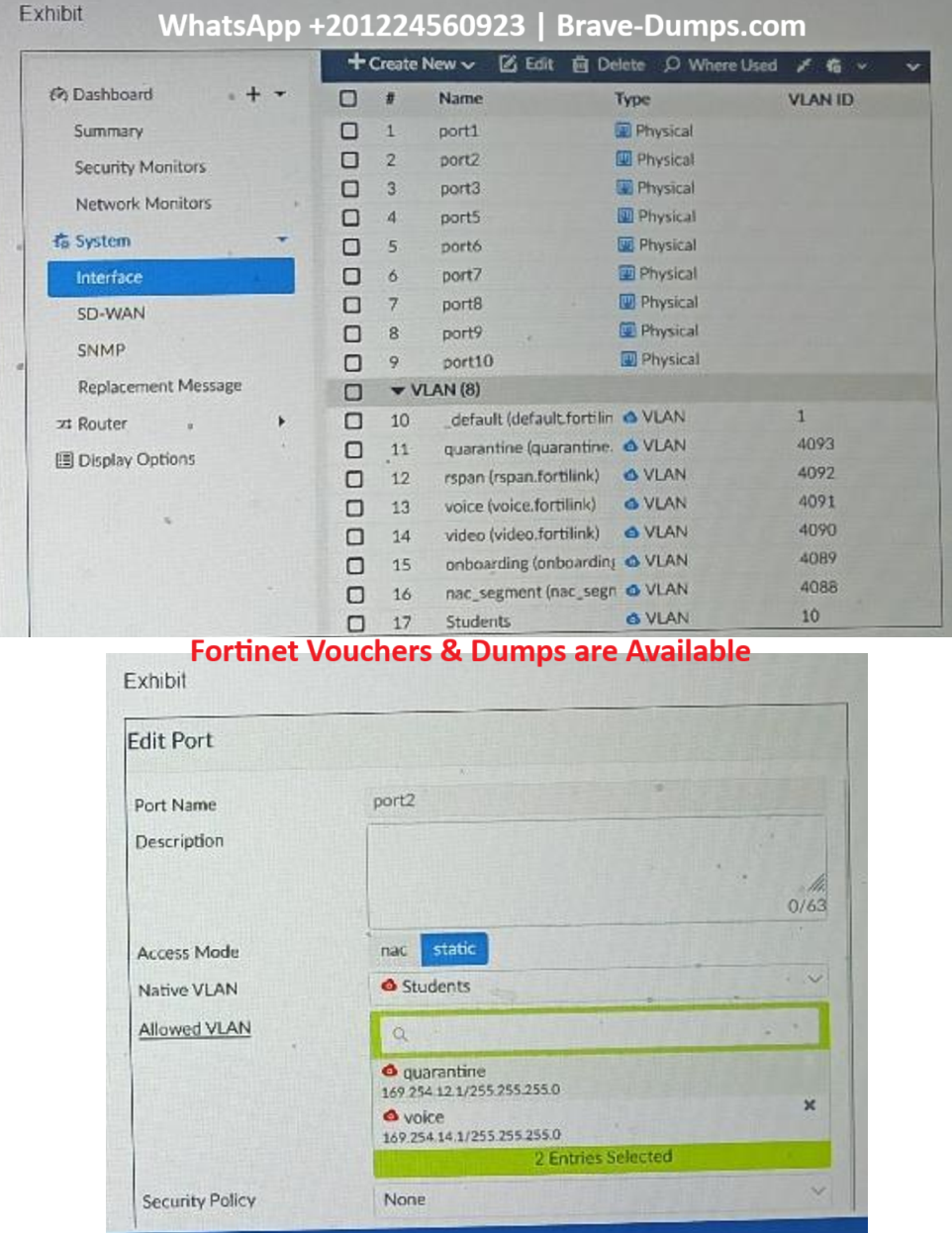
Refer to the exhibit.
Examine the FortiSwitch port configuration and the FortiGate interface configuration shown in the exhibit.
Based on the configuration shown in the exhibit, which two statements about how port2 handles tagged and untagged traffic are true?
(Choose two answers)
- A. Port2 accepts ingress untagged traffic for VLAN IDs 10, 4091, and 4093 only
- B. Port2 tags egress traffic for VLAN 10
- C. Port2 assigns ingress untagged traffic to VLAN 10
- D. Port2 accepts ingress tagged traffic for VLAN IDs 4091 and 4093 only
Question #54
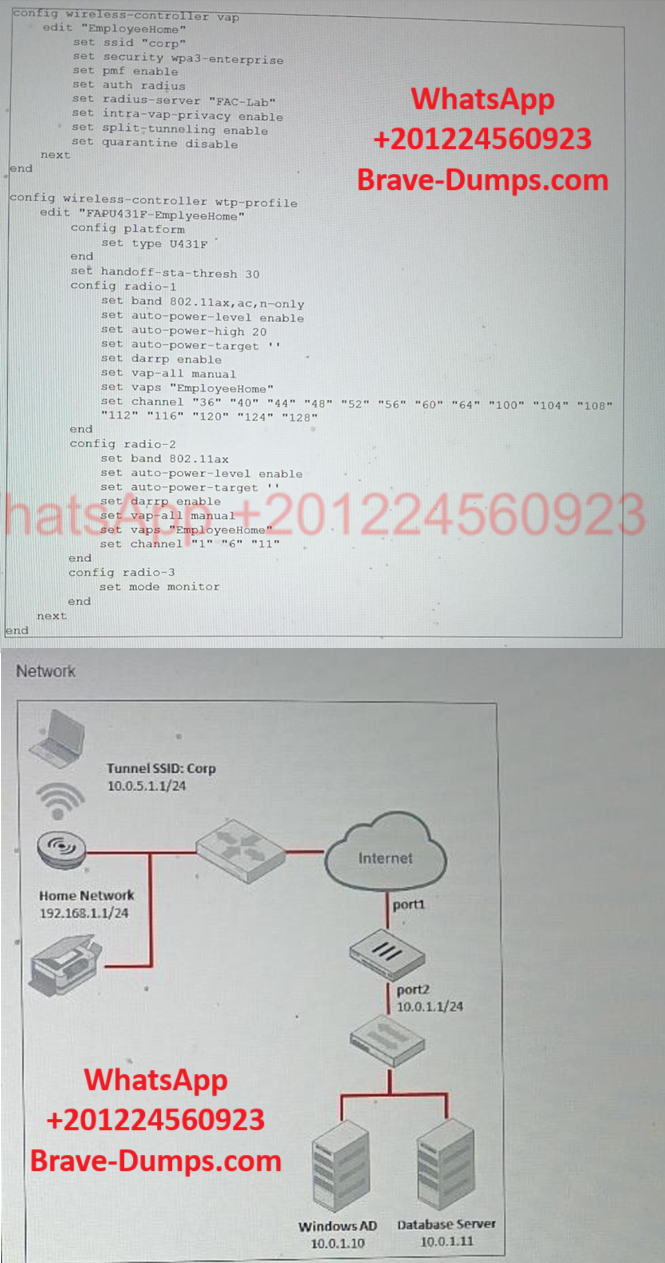
The CLI output shows a FortiGate configuration supporting a remote AP in an employee's home. The employee requires access to resources located on the company network, including the database server and AD server. The employee is trying to print to a printer connected in their home, but is not able to.
Which two solutions would resolve the issue?
(Choose two answers)
- A. Configure the EmployeeHome VAP profile for local bridging using the command set local-bridging enable.
- B. Configure the EmployeeHome VAP profile to disable host isolation using the command set intra-vap-privacy disable.
- C. Configure the FAPU431F-EmployeeHome WTP profile to enable split tunneling to the AP subnet using the command set split-tunneling-acl-local-ap-subnet enable.
- D. Configure the FARU431F-EmployeeHome wtp-profile to add a split tunneling ACL with a destination subnet of 192.168.1.1/24, using the command set dest-ip 192.168.1.1/24.
Question #55
Which three protocols are used for controlling FortiSwitch devices on FortiGate? (Choose three answers)
- A. FortiLink
- B. CAPWAP
- C. HTTPS
- D. IGMP
- E. FTP
Question #56
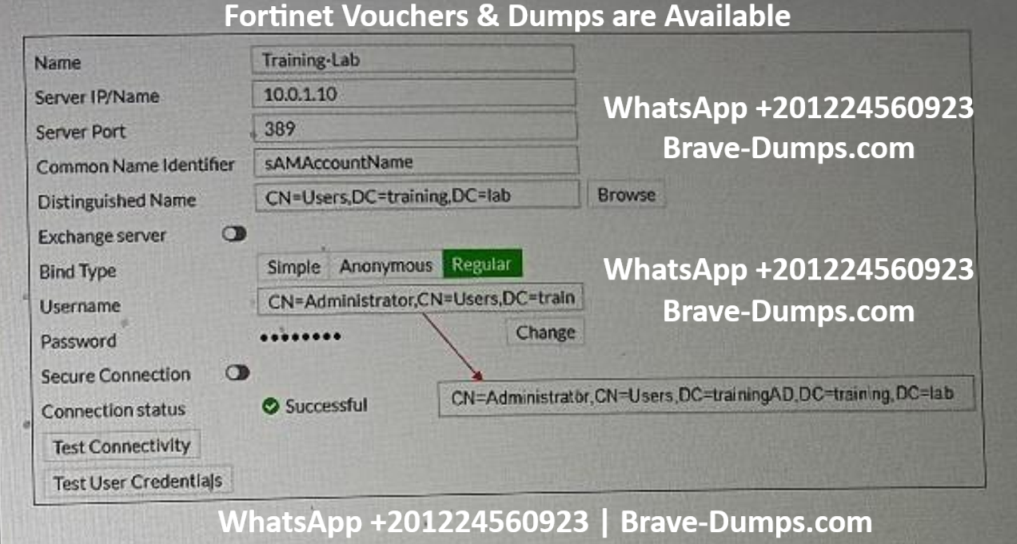
Refer to the exhibit
Examine the LDAP server configuration shown in the exhibit. Note that the Username setting has been expanded to display its full content.
On the Windows AD server 10.0.1.10, the administrator used dsquery, which returned the following output:
> dsquery user -samid student
"CN=student,CN=Users,DC=trainingAD,DC=training,DC=lab"
According to the output, which FortiGate LDAP setting is configured incorrectly?
(Choose one answer)
- A. Bind Type
- B. Distinguished Name
- C. Username
- D. Common Name Identifier
Question #57
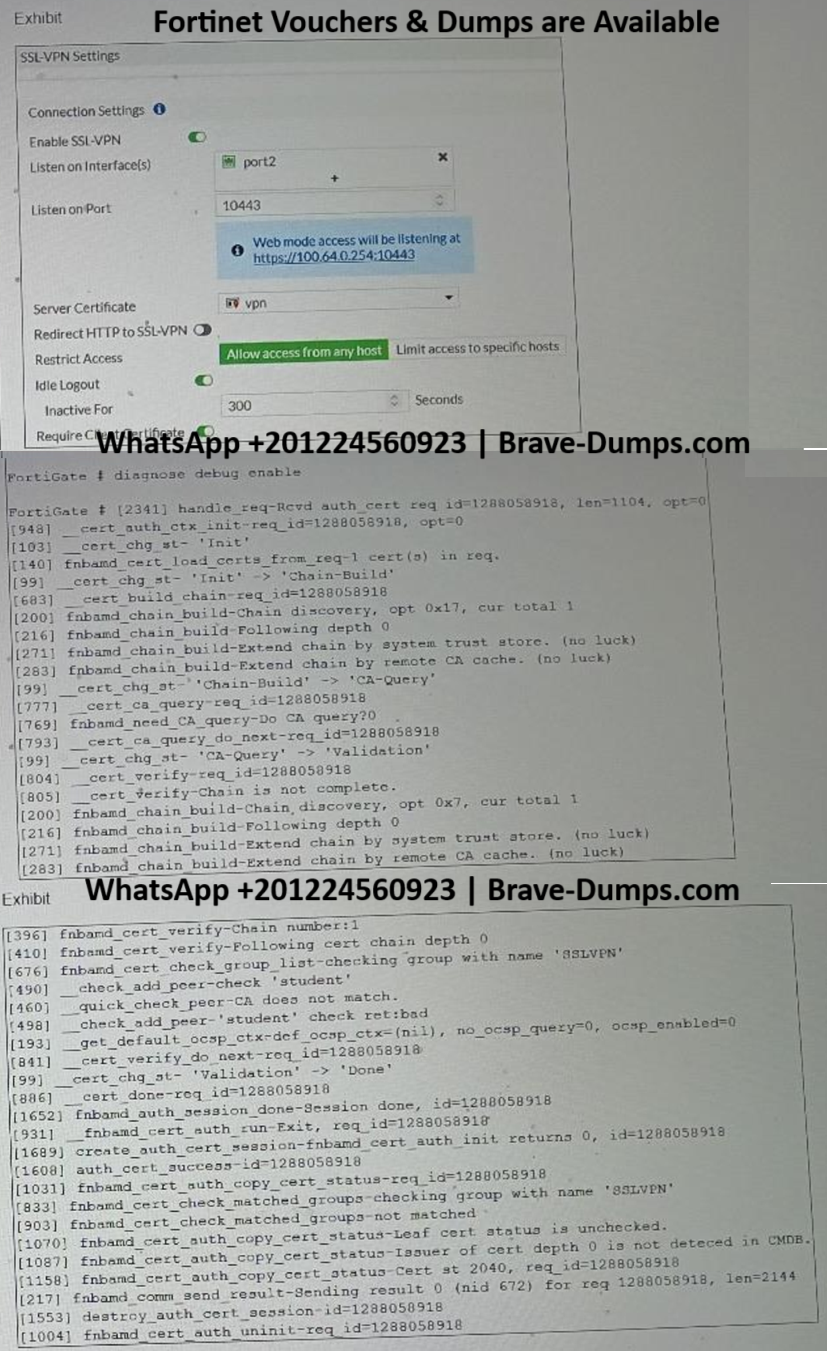
Refer to the exhibits
Examine the debug output and the SSL VPN configuration shown in the exhibits.
An administrator has configured SSL VPN on FortiGate. To improve security, the administrator enabled Required Client Certificate on the SSL VPN configuration page. However, a user is unable to successfully authenticate to SSL VPN.
Which configuration change should the administrator make to fix the problem?
(Choose one answer)
- A. Import the CA that signed the user certificate to FortiGate
- B. Enable Redirect HTTP to SSL-VPN on the SSL VPN configuration page
- C. Set the user certificate as the Server Certificate on the SSL VPN configuration page
- D. Import the CA that signed the SSL VPN Server Certificate to FortiGate
Question #58
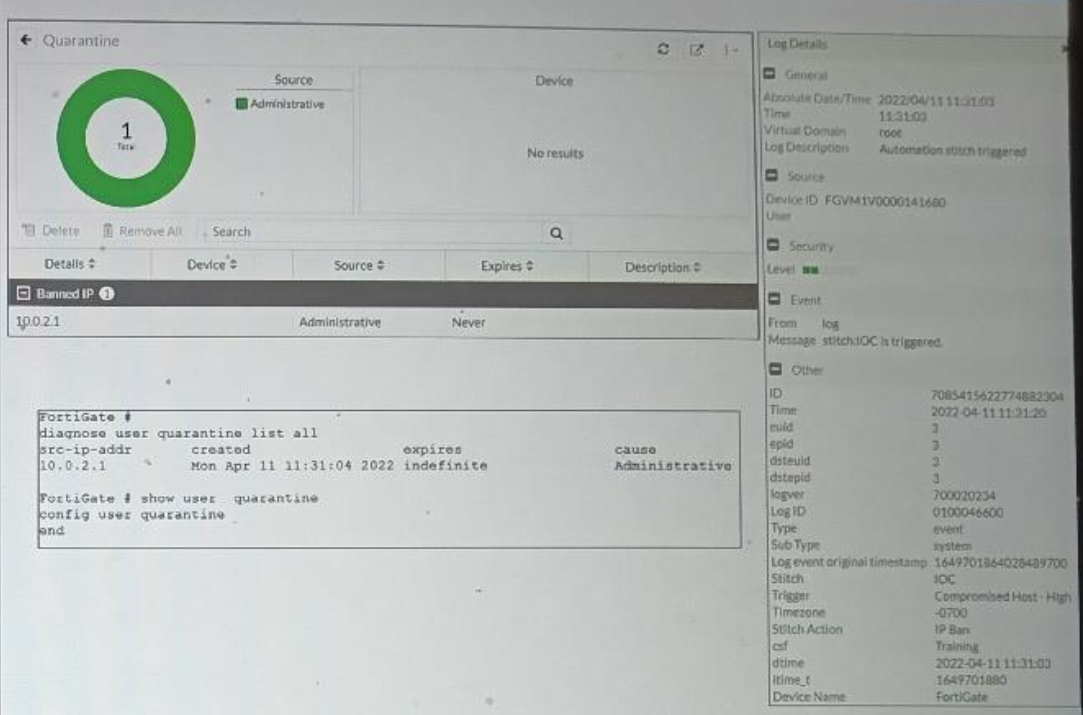
Refer to the exhibit
Examine the FortiGate logs, widget, and CLI output shown in the exhibit.
An administrator is testing the Security Fabric quarantine automation. The test device (10.0.2.1) is connected to a managed FortiSwitch device.
A few seconds after trying to access a malicious website from the test device, the test device can no longer access the internet and other VLANs in the network. However, the device is still able to access other devices in the same VLAN.
Based on the information shown in the exhibit, which modification should the administrator make to fix the problem?
(Choose one answer)
- A. Change the quarantine mode to by VLAN mode
- B. Change the quarantine mode to by redirect mode
- C. Configure a firewall policy on FortiGate to block the intra-VLAN traffic
- D. Enable the access layer quarantine action on the Quarantine_Devices automation stitch
Question #59
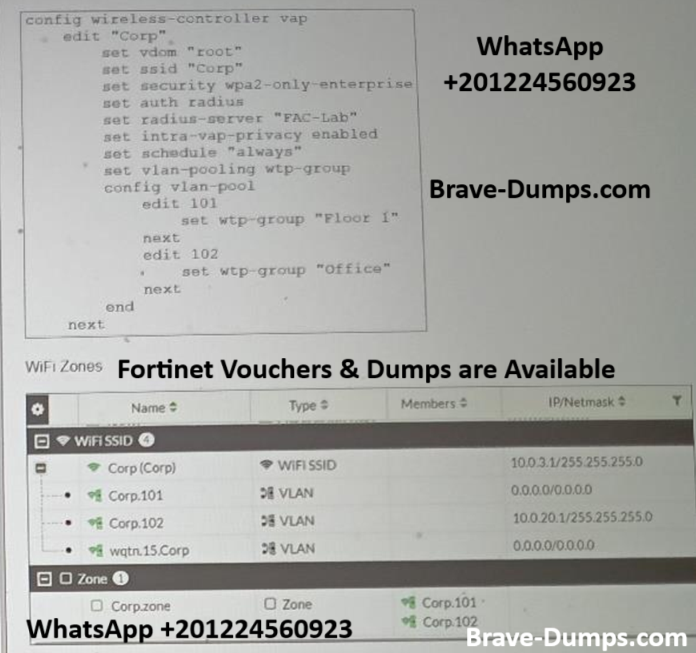
Refer to the exhibits
Examine the VAP configuration and the Wi-Fi zones table shown in the exhibits.
Which two statements describe the FortiGate behavior regarding assignment of VLANs to wireless clients?
(Choose two answers)
- A. All clients connecting to the Corp SSID will receive an IP address from the 10.0.3.1/24 subnet
- B. Clients connecting to APs in the Office group will be assigned to VLAN 102
- C. FortiGate will load balance clients using VLAN 101 and VLAN 102 and assign them an IP address from the 10.0.3.0/24 subnet
- D. Clients connecting to APs in the Floor 1 group will not be able to receive an IP address
Question #60
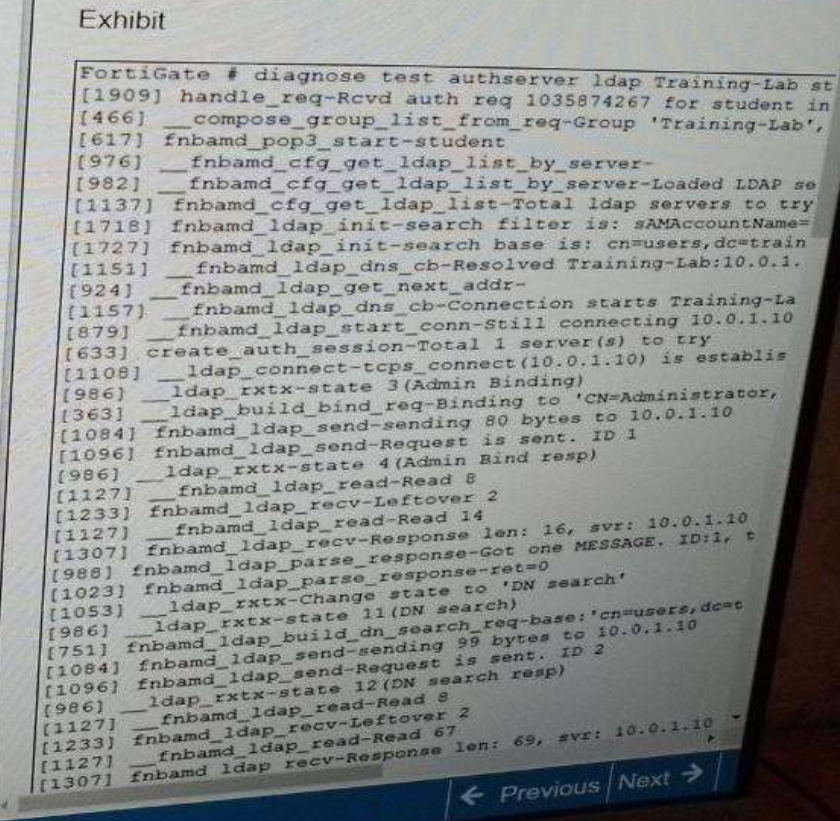
Refer to the exhibit
Examine the partial debug output shown in the exhibit.
Which two statements about the debug output are true?
(Choose two answers)
- A. The LDAP DN search did not match any LDAP user
- B. The credentials provided for student are correct
- C. The Training-Lab LDAP server is configured to use regular bind
- D. The connection to the Training-Lab LDAP server timed out
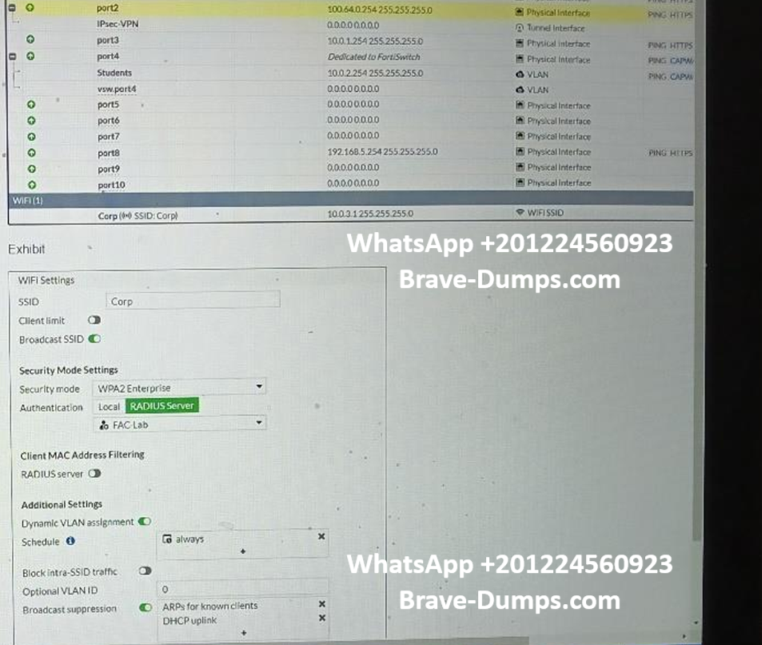
Refer to the exhibits.
An administrator has configured FortiGate with an SSID (Corp) with dynamic VLAN assignment, and also configured a RADIUS server to send IETF 64, IETF 65, and IETF 81 VSAs.
The administrator has verified that the RADIUS server is sending all the required information to FortiGate. However, FortiGate is not assigning correct VLANs to the wireless clients.
What is causing the problem? (Choose one answer)