● F5 BIG-IP LTM Specialist: Maintain and Troubleshoot (301b) Exam Materials
Question #1
Question #2
An LTM Specialist tries to deploy a new HTTPS Virtual Server using SSL offloading which is NOT working correctly. To troubleshoot, the LTM Specialist performs a fiddler capture and finds the following:
tunnel_info:
status: "OPEN"
type: "HTTP CONNECT Tunnel"
description: "This tunnel enables a client to send raw traffic through a HTTP Proxy Server (like Fiddler)."
statistics:
request_count: 1
bytes_sent: 193
bytes_received: 107
tunnel_sent_bytes: 137
tunnel_received_bytes: 0
actual_performance:
client_connected: "11:27:08.077"
client_begin_request: "11:27:08.080"
got_request_headers: "11:27:08.080"
client_done_request: "11:27:08.080"
determine_gateway: "1ms"
dns_lookup: "0ms"
tcp_ip_connect: "125ms"
https_handshake: "0ms"
server_connected: "11:27:08.247"
fiddler_begin_request: "11:27:08.247"
server_got_request: "11:27:08.247"
server_begin_response: "00:00:00.000"
got_response_headers: "00:00:00.000"
server_done_response: "00:00:00.000"
client_begin_response: "11:27:08.257"
client_done_response: "11:27:08.257"
client_done_response: "11:27:08.257"
overall_elapsed: "0:00:00.176"
RESPONSE BYTES (by Content-Type)
~headers~: 107
The Virtual Server configuration is:
ltm virtual /Common/www.brave-dumps.com {
destination /Common/10.0.10.10:443
ip-protocol tcp
mask 255.255.255.255
pool /Common/www.brave-dumps.com
profiles {
/Common/http { }
/Common/tcp { }
}
source 0.0.0.0/0
source-address-translation {
type automap
}
translate-address enabled
translate-port enabled
}
Why is the Application NOT working?
(Choose one answer)
- A. Although SNAT Automap is configured, a Self-IP is missing on the server-side VLAN.
- B. The Server-SSL Profile is using only ciphers NOT supported on the server.
- C. The Server-Side TCP Profile is tuned too aggressively.
- D. The Virtual Server is missing additional configuration.
Question #3
A Web Server Administrator is reporting uneven resource utilization among the following pool of application servers:
10.251.63.12
10.248.63.15
10.248.63.23
10.251.131.17
10.248.63.21
The non-floating self-ip is 10.251.91.7. The self-ip is associated with the traffic-group 10.251.91.5. The virtual address associated with this application is 10.251.187.122
The F5 LTM Specialist performs tcpdump traces to troubleshoot the issue.
TCPDUMP FrontEnd:
tcpdump: verbose output suppressed, use -v or -vv for full protocol decode
listening on 0.0.0.0, link-type EN10MB (Ethernet), capture size 96 bytes
IP 10.33.71.21.107 > 10.251.187.122.80: Flags [S], seq 1605156006, win 65535
IP 10.251.187.122.80 > 10.33.71.21.107: Flags [S.], seq 2109238367, ack 1605156007, win 65535
IP 10.33.71.21.107 > 10.251.187.122.80: Flags [.], ack 1, win 65535
IP 10.33.71.21.107 > 10.251.187.122.80: Flags [P.], seq 1:449, ack 1, win 65535
IP 10.251.187.122.80 > 10.33.71.21.107: Flags [.], ack 449, win 65535
IP 10.251.187.122.80 > 10.33.71.21.107: Flags [P.], seq 1:1460, ack 449, win 65535
IP 10.33.71.21.107 > 10.251.187.122.80: Flags [.], ack 1460, win 65535
IP 10.33.71.21.107 > 10.251.187.122.80: Flags [F.], seq 449, ack 1460, win 65535
IP 10.251.187.122.80 > 10.33.71.21.107: Flags [F.], seq 1460, ack 450, win 65535
IP 10.33.71.21.107 > 10.251.187.122.80: Flags [.], ack 1461, win 65535
23 packets captured
23 packets received by filter
0 packets dropped by kernel
TCPDUMP BackEnd
tcpdump: verbose output suppressed, use -v or -vv for full protocol decode
listening on 0.0.0.0, link-type EN10MB (Ethernet), capture size 96 bytes
IP 10.240.63.21.80 > 10.251.91.5.4345: Flags [S.], seq 559307408, ack 559307409, win 4300
IP 10.251.91.5.4345 > 10.240.63.21.80: Flags [.], ack 1, win 4300
IP 10.240.63.21.80 > 10.251.91.5.4345: Flags [P.], seq 1:1460, ack 1, win 4300
IP 10.251.91.5.4345 > 10.240.63.21.80: Flags [.], ack 1460, win 4300
IP 10.240.63.21.80 > 10.251.91.5.4345: Flags [P.], seq 1460:2907, ack 1, win 4300
IP 10.251.91.5.4345 > 10.240.63.21.80: Flags [.], ack 2907, win 4300
IP 10.240.63.21.80 > 10.251.91.5.4345: Flags [F.], seq 2907, ack 1, win 4300
IP 10.251.91.5.4345 > 10.240.63.21.80: Flags [F.], seq 1, ack 2908, win 4300
IP 10.240.63.21.80 > 10.251.91.5.4345: Flags [.], ack 2, win 4300
36 packets captured
36 packets received by filter
0 packets dropped by kernel
What is the root cause of the issue?
(Choose one answer)
- A. The load balancing method is NOT optimal.
- B. Several pool members are being marked down by the pool monitor.
- C. The F5 LTM appliance is NOT configured for OneConnect.
- D. The F5 LTM is caching the contents of the application.
Question #4
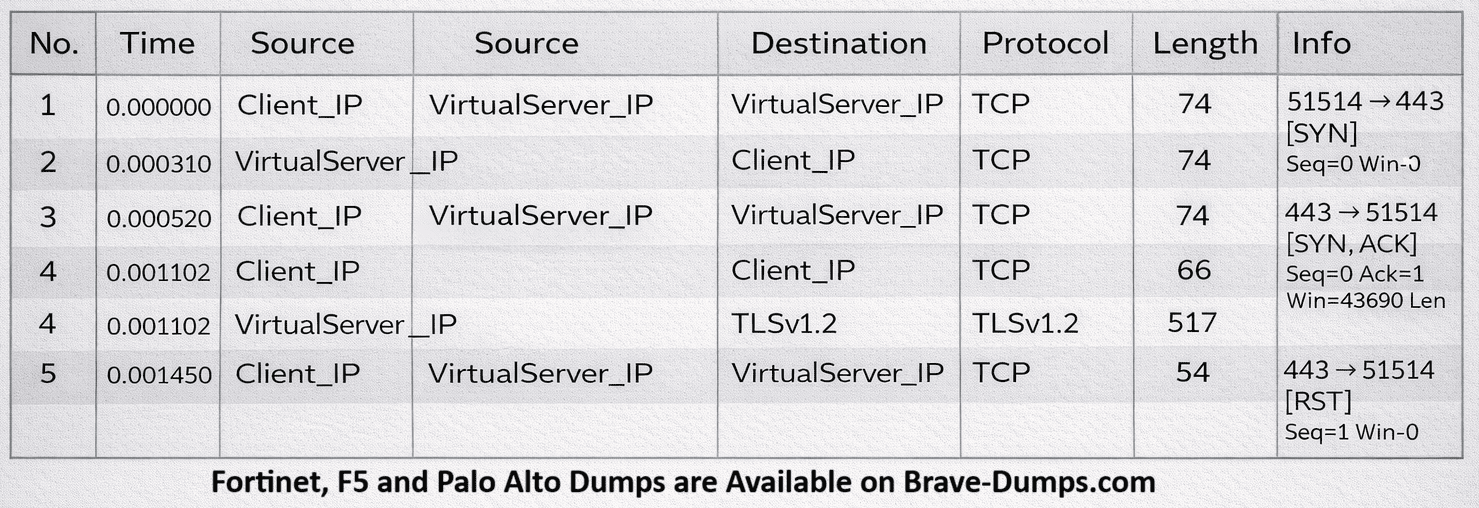
Refer to the exhibit.
An LTM Specialist is troubleshooting a secure website that is inaccessible when using the Virtual Server on the LTM device. A tcpdump performed on the LTM device on the same VLAN where the Virtual Server exists is shown.
Why is the website inaccessible?
(Choose one answer)
- A. There are NO available pool members in the associated pool.
- B. The client is using an incompatible cipher suite.
- C. An SSL client profile is NOT associated with the Virtual Server.
- D. A port 80 redirect Virtual Server does NOT exist.
Question #5
An LTM Specialist receives reports of issues from LTM engineers about connectivity to the LTM Management interface. The LTM device has two VLANs configured: an internal and an external. The LTM engineers use many different browsers.
Which tcpdump should the LTM Specialist run to determine the issue?
(Choose one answer)
- A. tcpdump -nni 0.0
- B. tcpdump -nni external
- C. tcpdump -nni eth0
- D. tcpdump -nni internal
Question #6
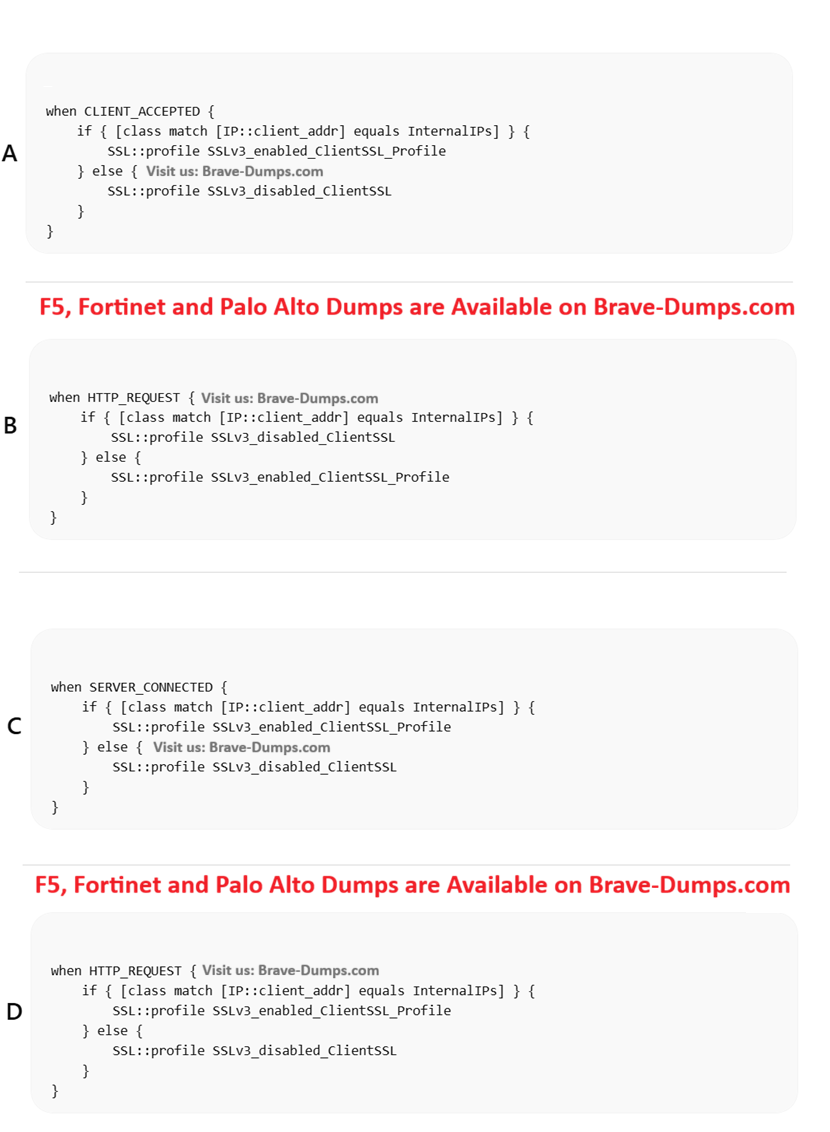
An LTM Specialist has an HTTPS Virtual Server. When the SSLv3 is disabled, some legacy clients that run on internal subnets stop working.
The LTM Specialist creates a data group called InternalIPs. This data group contains the subnets that run the legacy clients and two ClientSSL profiles:
SSLV3_enabled_ClientSSL_Profile for the specific subnets
SSLV3_disabled_ClientSSL_Profile for the rest of the users
Which iRule should the LTM Specialist apply to meet the requirements?
(Choose one answer)
- A. Image A
- B. Image B
- C. Image C
- D. Image D
Question #7
An LTM Specialist is unable to see any connections on the application server. In the LTM GUI, the server in the pool shows as down. The LTM Specialist runs a tcpdump to determine why the failure is occurring.
Refer to the output shown:
[root@ltm01:Active:Changes Pending] config # tcpdump -nni 0.0 host 10.100.98.69
tcpdump: verbose output suppressed, use -v or -vv for full protocol decode
listening on 0.0, link-type EN10MB (Ethernet), capture size 96 bytes
17:40:31. IP 10.84.98.51. > 10.100.98.69.80: S (0) win <mss
1460,sackOK,timestamp 1851
17:40:31. IP 10.100.98.69.80 > 10.84.98.51. R 0:0(0) ack win 0
What are two potential causes of this issue?
(Choose two answers)
- A. The HTTP monitor send string is NOT recognized by the server
- B. The server is NOT listening on port 80
- C. The LTM device has lost its route to the server
- D. The LTM device is NOT receiving the correct response string
- E. A firewall or other network device is blocking the traffic
Question #8
A standalone LTM device has an external WAN where client connections arrive and an internal LAN where the LTM device accesses the backend servers. The backend servers do NOT have the LTM device as the default gateway.
The configuration is as shown.
client ip address: 1.1.1.10
bigip self ip on external vlan: 3.3.3.3
virtual server configuration:
# list ltm virtual WEB ltm virtual WEB
destination 4.4.4.25:https
ip-protocol tcp
mask 255.255.255.255
pool Pool-HTTP
profiles {
clientssl {
context clientside
}
http { }
tcp { }
}
source 0.0.0.0/0
source-address-translation {
type automap
}
translate-address disabled
vs-index 39
# list ltm pool Pool-HTTP
ltm pool Pool-HTTP {
members {
3.3.3.10:http {
address 3.3.3.10
}
}
}
An end user tries a connection to the HTTP application https://4.4.4.25
but is unable to access it. The LTM Specialist performs a trace as shown.
tcpdump: verbose output suppressed, use -v or -vv for full protocol decode
listening on 0.0, link-type EN10MB (Ethernet), capture size 96 bytes
19:51:26. IP 1.1.1.10. > 4.4.4.25.https: S
1460, nop, wscale 2, nop, nop, sackOK
19:51:26. IP 4.4.4.25.https > 1.1.1.10. : S
win 4380, <mss 1460, sackOK, eol>
19:51:26. IP 1.1.1.10. > 4.4.4.25.https: . ack 1 win 64240
19:51:26. IP 1.1.1.10. > 4.4.4.25.https: P 1:139(138) ack 1 win 64240
19:51:26. IP 4.4.4.25.https > 1.1.1.10.53843: . ack 139 win 5115
19:51:26. IP 3.3.3.3.4160 > 4.4.4.25.http: S 4135155697:4135155697(0) win 4380 <mss
1460, sackOK, eol>
19:51:26. IP 4.4.4.25.http > 3.3.3.3. : R 0:0(0) ack
19:51:26. IP 4.4.4.25.https > 1.1.1.10. : R 146:146(0) ack 139 win 511
What should the LTM Specialist change in the Virtual Server configuration to fix this problem?
(Choose one answer)
- A. Select "None" in the "Source Address Translation" option
- B. Disable clientside SSL
- C. Add a serverside SSL profile
- D. Enable the "Address Translation" option
Question #9
A newly deployed HTTPS Virtual Server using SSL offloading is NOT working correctly. An LTM Specialist performs a fiddler capture on their machine and finds the following:
This is a Tunnel. Status: OPEN, Raw Bytes Out: 137; In: 0
The selected session is a HTTP CONNECT Tunnel. This tunnel enables a client to send raw traffic
(e.g., HTTPS-encrypted streams or WebSocket messages) through a HTTP Proxy Server (like Fiddler).
Request Count: 1
Bytes Sent: 193 (headers: 193; body: 0)
Bytes Received: 107 (headers: 107; body: 0)
Tunnel Sent: 137
Tunnel Received: 0
ACTUAL PERFORMANCE
ClientConnected: 11:27:08.077
ClientBeginRequest: 11:27:08.080
GotRequestHeaders: 11:27:08.080
ClientDoneRequest: 11:27:08.080
Determine Gateway: 1ms
DNS Lookup: 0ms
TCP/IP Connect: 125ms
HTTPS Handshake: 0ms
ServerConnected: 11:27:08.247
FiddlerBeginRequest: 11:27:08.247
ServerGotRequest: 11:27:08.247
ServerBeginResponse: 00:00:00.000
GotResponseHeaders: 00:00:00.000
ServerDoneResponse: 00:00:00.000
ClientBeginResponse: 11:27:08.257
ClientDoneResponse: 11:27:08.257
Overall Elapsed: 0:00:00.176
RESPONSE BYTES (by Content-Type)
~headers~: 107
The Virtual Server configuration is:
ltm virtual /Common/www.brave-dumps.com {
destination /Common/10.0.10.10:443
ip-protocol tcp
mask 255.255.255.255
pool /Common/www.brave-dumps.com
profiles {
/Common/http { }
/Common/tcp { }
}
source 0.0.0.0/0
source-address-translation {
type automap
}
translate-address enabled
translate-port enabled
}
What should the LTM Specialist configure to fix this problem?
(Choose one answer)
- A. A SNAT pool
- B. A client SSL profile
- C. A server SSL profile
- D. A server-side protocol profile
Question #10
Which file should be configured for a custom user-defined SNMP trap? (Choose one answer)
- A. /etc/alertd/alert.conf
- B. /etc/alertd/user_alert.conf
- C. /config/user_alert.conf
- D. /config/bigip.conf
Refer to the configuration shown:
ltm pool /Common/pool_80 {
members {
/Common/10.1.1.10:80 {
address 10.1.1.10
state up
}
/Common/10.1.1.11:80 {
address 10.1.1.11
state up
}
}
monitor /Common/http
}
ltm virtual /Common/vs_virtual {
destination /Common/192.168.105.10:443
ip-protocol tcp
mask 255.255.255.255
pool /Common/pool_80
profiles {
/Common/clientssl {
context clientside
}
/Common/http { }
/Common/serverssl {
context serverside
}
/Common/tcp { }
}
}
source 0.0.0.0/0
source-address-translation {
type automap
}
translate-address enabled
translate-port enabled
}
ltm virtual-address /Common/192.168.105.10 {
address 192.168.105.10
arp enabled
icmp-echo enabled
mask 255.255.255.255
traffic-group /Common/traffic-group-1
}
What should the LTM Specialist do to resolve the user connection failures? (Choose one answer)