● NSE 6 - FortiSOAR 7.6 Analyst Exam Materials
NSE 6 - FortiSOAR 7.6 Analyst Exam Materials
Question #1
Question #2
A FortiSOAR playbook starts a FortiManager policy install task.
A later step checks the task status. The step should repeat until a condition is met, such as the connector action returning Success, or until the retry limit is reached.
Which playbook mechanism is best suited to meet this requirement?
(Choose one answer)
- A. A Decision step
- B. A Do Until loop
- C. A Wait step
- D. A For Each loop
Question #3
You installed a new security information and event management (SIEM) connector and want to ingest data into FortiSOAR.
Which three tasks can you perform using the Data Ingestion Wizard?
(Choose one answer)
- A. Map fields from the source data to a module.
- B. Set up bidirectional synchronization with the data source.
- C. Set up the schedule for pulling data into FortiSOAR.
- D. Define preprocessing rules to drop unwanted incoming records.
- E. Fetch sample data from the source.
- F. Create rules for auto assignment.
Question #4
A FortiSOAR playbook has paused execution while waiting for a task record to be completed or skipped.
Which playbook step is responsible for this behavior?
(Choose one answer)
- A. Wait
- B. Decision
- C. Manual Task
- D. Approval
Question #5
Refer to the expression:
{{ alerts | json_query("[?severity > `{{ vars.threshold }}`]") }}
Assume the following:
vars.threshold = 50
Why is the Jinja expression not working?
(Choose one answer)
- A. The JSON query can compare only string values.
- B. The `vars.threshold` must be an integer.
- C. The JSON query requires string substitution to use Jinja context.
- D. The outer query string should use single quotes.
Question #6
An analyst must create a playbook that meets the following requirements:
1. The playbook is started manually and does not require a record to be selected.
2. The playbook finds alert records created in the past 24 hours that contain test ingest in the name.
3. The playbook displays each matching alert record in an approval prompt.
4. If rejected, the playbook does nothing further.
5. If approved, the playbook sets the status of the matching alert records to Closed.
Which step sequence accomplishes this with the fewest steps?
(Choose one answer)
- A. Manual Input → Manual Trigger → Find Records → Approval → Close Records
- B. Manual Trigger → Find Records → Approval → Update Records
- C. Manual Trigger → Find Records → Set Variable → Find Records → Set Variable → Approval → Update Records
- D. Manual Trigger → Find Records → Manual Input → Decision → Update Records
Question #7
An external system needs to send data to FortiSOAR and start a playbook.
Which trigger type should the playbook use?
(Choose one answer)
- A. Connector
- B. Scheduled
- C. Custom API endpoint
- D. Referenced
Question #8
An analyst created and published a new FortiSOAR module.
Which two actions must the analyst perform before users can open the module from the GUI and create records in it?
(Choose two answers)
- A. Add the module to the visual correlation widget.
- B. Restart the PostgreSQL database service.
- C. Add the module to the navigation menu.
- D. Assign users a role with the required create, read, update, and delete (CRUD) permissions to the module.
Question #9
Review the following expression:
{{ connections | yaql("
$.where($.port = 443).select({destination_ip => $.destination_ip, protocol => 'HTTPS'})
+ $.where($.port = 22).select({destination_ip => $.destination_ip, protocol => 'SSH'})
+ $.where($.port = 53).select({destination_ip => $.destination_ip, protocol => 'DNS'})
") }}
Which two statements about the YAQL query are accurate?
(Choose two answers)
- A. It converts protocol names into port numbers.
- B. It returns transformed results with a protocol key instead of a port key.
- C. It creates a separate list for each protocol.
- D. It maps port numbers to protocol names.
- E. It sorts the results by destination IP address in descending order.
Question #10
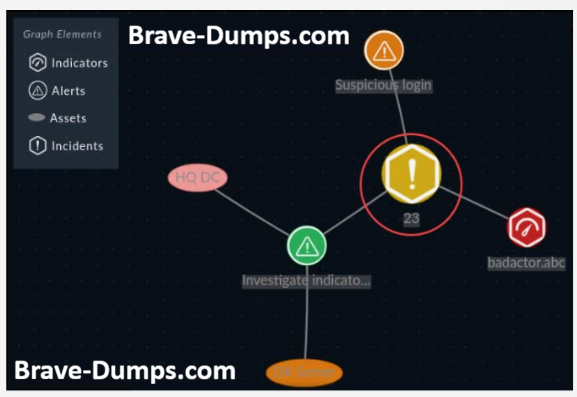
Refer to the exhibit.
The incident is named Malicious Indicator Detected.
However, the visual correlation widget is showing the incident ID (23) instead of the name.
How does an analyst fix this problem?
(Choose one answer)
- A. Modify the node label in the incident module visual correlation settings.
- B. Modify the display template in the Incident module schema.
- C. Modify the primary field in the Incident module schema.
- D. Modify the Incident module record view template.
Manually triggered playbooks execute successfully, but scheduled playbooks have stopped triggering at their set intervals.
Which FortiSOAR service is most likely not operating in a normal state? (Choose one answer)